jrni / Saas Tech

jrni / Saas Tech

jrni / Saas Tech

Booking journey builder

Booking journey builder

A code-free way to build booking journeys

A code-free way to build booking journeys

UX/UI/Product Design

UX/UI Design

Product Management

B2B2C

Enterprise UX

B2B2C

Enterprise UX

Overview

Client: jrni

Industry: SaaS Tech

Role: Product Owner,
Product Manager,
Product Designer,
Duration: ~10 months

Context

Jrni is a SaaS platform that enables personalised interactions across appointments, events, and queues for enterprise clients primarily in finance and retail, including brands such as HSBC, Santander, Chanel, and John Lewis.


I owned and led product and design across the entire Journey Builder ecosystem, including the redesigned booking journeys itself and the branding themes builder-though this case study focuses on the core tool: the Journey Builder.

The challenge

The challenge

The challenge

Outdated booking journeys

Outdated appointment booking journey interface with low usability

Complex booking journey-configurations

Heavy internal dependency and long back-and-forth cycles with customers 

Heavy internal dependency and lomg back-and-forth cycles

Legacy Angular front end

Journeys were slow and not secure, requiring a React rebuild

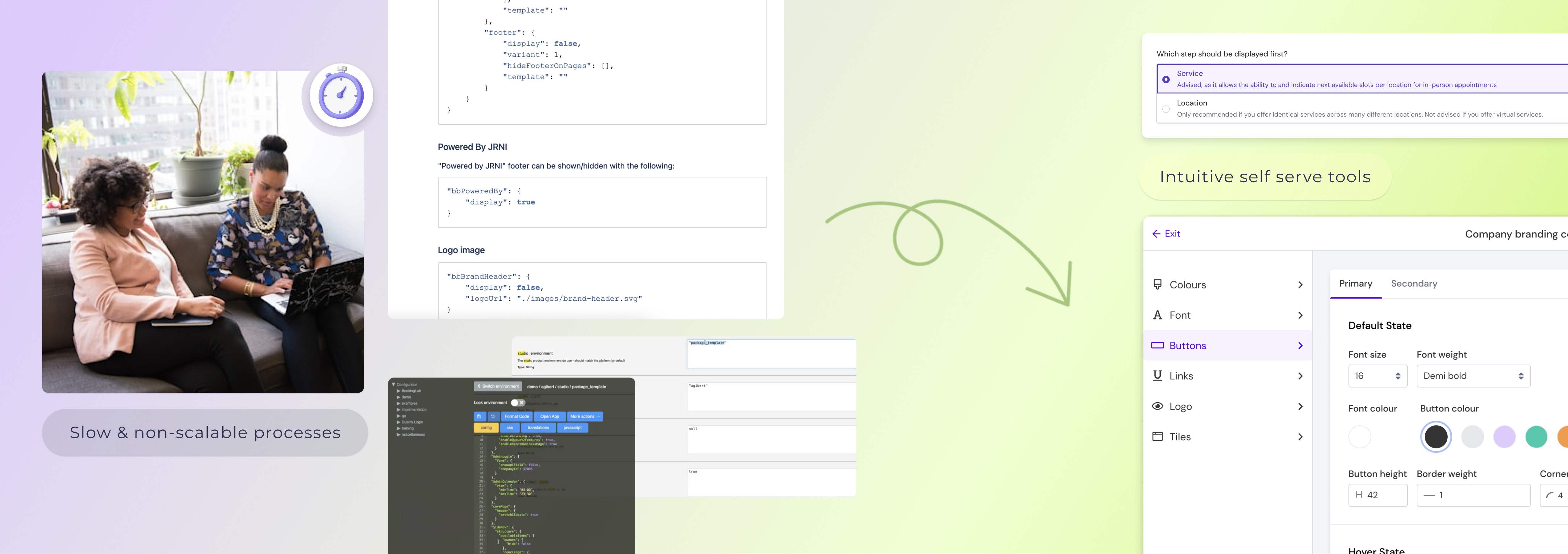
Jrni’s existing booking journeys were powerful but fragile. Customers could not configure journeys themselves. Every change required: A customer request, manual configuration in multiple internal tools, writing or editing JSON, testing, fixing errors- and then repeating the cycle all over again…

This process was super slow, error-prone, frustrating for customers but also increasingly unscalable for jrni.


The brief was clear: End the chaos!

  • Empower customers to build and manage their own journeys and thereby reduce internal workload

  • Remove code from the process

  • Standardise the platform

  • Enable jrni to scale across enterprise clients and markets

_______________

My role(s)

_______________

My role(s)

_______________

My role(s)

I was given the opportunity to own this project end-to-end across UX design, product management and delivery. Specifically, I:

  • Led discovery, definition, and prioritisation

  • Facilitated user research across customers and internal departments

  • Defined the product vision, development timeline and phased rollout

  • Acted as the main decision-maker on UX, trade-offs, strategy and scope

  • Designed the solution itself

  • Worked hands-on with engineers throughout development

  • Drove customer adoption post-launch

This project required strong product judgment, emotional intelligence, and adaptability - like hosting a dinner with Gordon Ramsay, Simon Cowell, and Anthony Bourdain and expecting polite conversation.


_______________

Discovery & research

_______________

Discovery & research

_______________

Discovery & research

I started by deeply understanding both sides of the problem.


Internal research

  • Interviewed implementation, CS, professional services, product, and sales

  • Mapped internal workflows and failure points

  • Identified scalability blockers and technical constraints

Customer research

  • Conducted interviews with 5 enterprise customers across finance and retail (e.g. HSBC, Urban Outfitters)

  • Validated pain points and uncovered unmet needs

  • Analysed competitor tools to understand market expectations and gaps

I started by deeply understanding both sides of the problem.


Internal research

  • Interviewed implementation, CS, professional services, product, and sales

  • Mapped internal workflows and failure points

  • Identified scalability blockers and technical constraints

Customer research

  • Conducted interviews with 5 enterprise customers across finance and retail (e.g. HSBC, Urban Outfitters)

  • Validated pain points and uncovered unmet needs

  • Analysed competitor tools to understand market expectations and gaps

I started by deeply understanding both sides of the problem.


Internal research

  • Interviewed implementation, CS, professional services, product, and sales

  • Mapped internal workflows and failure points

  • Identified scalability blockers and technical constraints

Customer research

  • Conducted interviews with 5 enterprise customers across finance and retail (e.g. HSBC, Urban Outfitters)

  • Validated pain points and uncovered unmet needs

  • Analysed competitor tools to understand market expectations and gaps

Internal workflows limit scalability

Complex internal tools/processes to implement or edit the journeys slowed growth and impact customer retention.

Autonomy vs
guidance

Customers wanted control over their booking journeys, but needed guardrails to prevent errors and make the set up quick and intuitive.

Customisations with boundaries

Flexibility was important, yet unlimited freedom threatened customers brand consistency and our internal maintainability.
Definition & product strategy

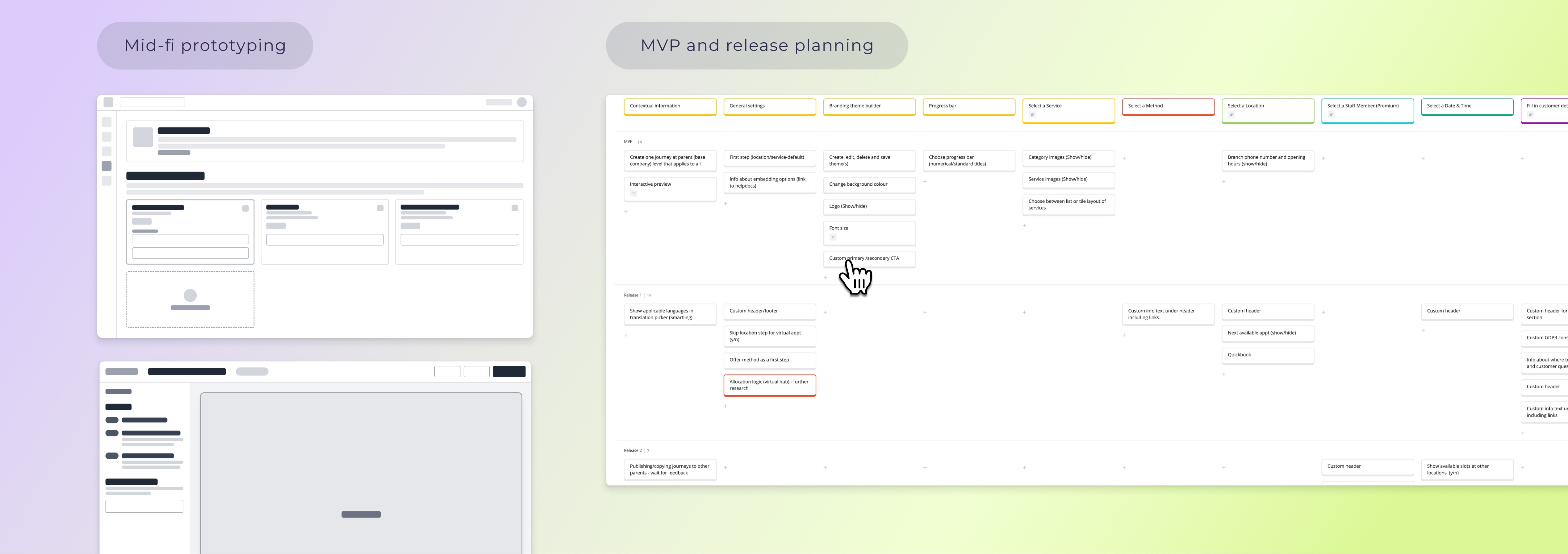
I defined the complete feature ecosystem and ran prioritisation sessions with stakeholders to align on value and feasibility. Features were prioritised based on drivers like customer impact, competitive parity, revenue potential, technical dependencies, and migration risk.
I worked closely with developers to estimate effort and set delivery timelines. Moreover I translated the features into detailed Jira tickets with user stories, acceptance criteria, and performance requirements.

I also conducted an analysis of risks, assumptions, and constraints prior to dev start and mapped out a phased rollout strategy. (What all did you do? "Yes")

A key early decision was where to draw the line on customisation.

While customers wanted flexibility, a full WYSIWYG website builder would have been impossible to maintain, expensive and slow to develop. Instead, I defined a standardised but configurable system-enough flexibility to meet all needs, with constraints that protected usability, performance, and long-term scalability.


Ideation & collaboration

I created a master problem space documenting all issues, needs and pain points found-functional, technical, and organisational and thought about solutions for each, discussing them in daily collaboration sessions with product and engineering.


This is where my role shifted constantly between: UX advocate, product strategist, facilitator, decision-maker.

I learned when to push, when to compromise, and how to design under constraints.

Multiple workshops were also focussed on finding the right information architecture, making sure the flow is intuitive, coherent and only accessible with the correct permissions per role.


Prototyping, testing & iteration

I designed hi-fi, animated prototypes in Figma and used them as the basis for user testing. To move fast, I:

  • Made good use of our Usertesting.com subscription to validate flows with persona-matched user segments

  • Ran multiple testing rounds focused on key tasks

  • Iterated continuously based on behavioural and verbal feedback

  • Used Ai features in Figma to speed up component creation and iterations
_______________

Key product decisions

______________

Key product decisions

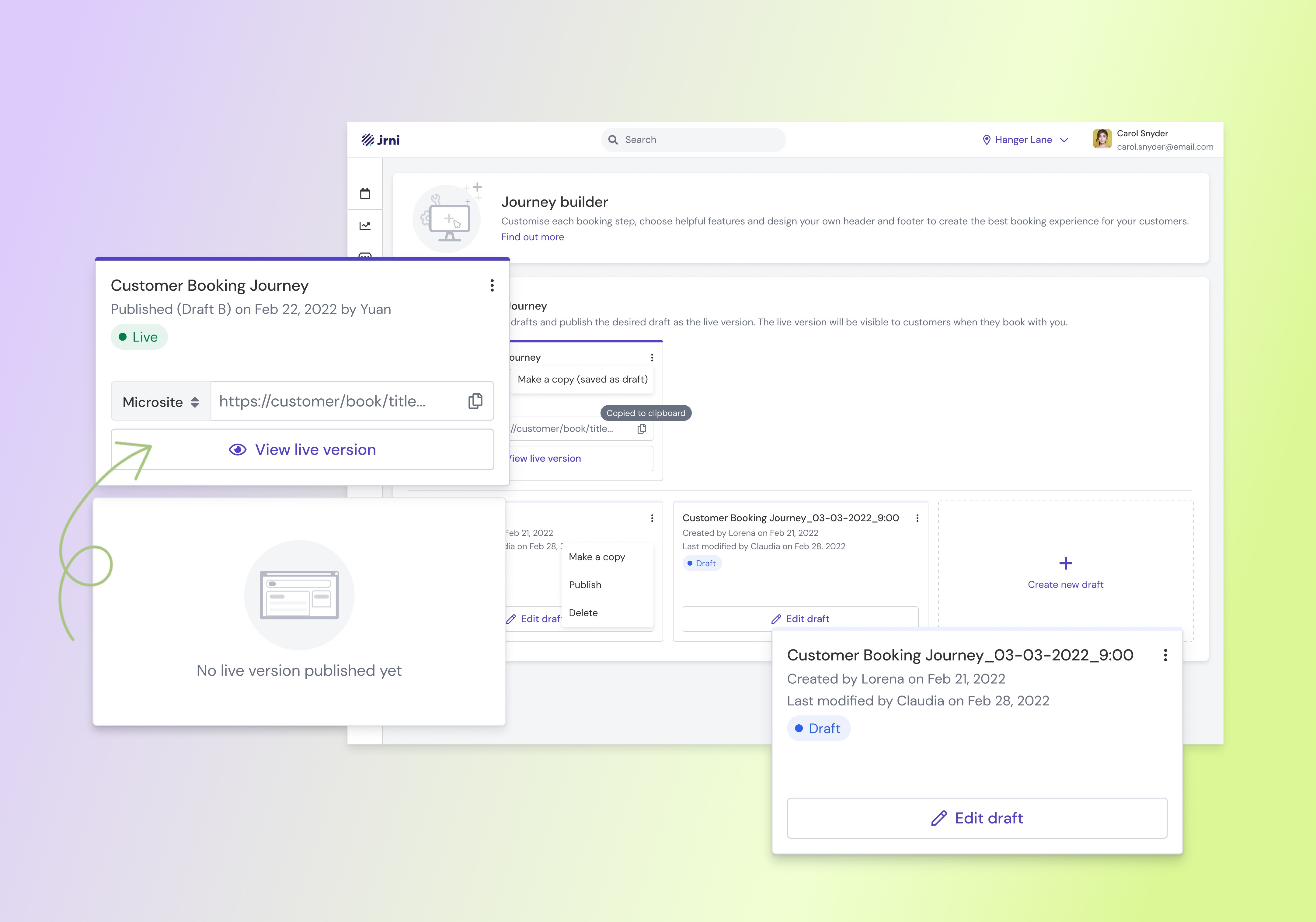
Information architecture and permissions

Enterprise customers operate with strict HQ hierarchies
→ Only HQ admins can manage journeys on (grand)parent level; journeys auto-cascade to child locations.

  • Organisations operate multiple brands and regions, often with differing legal or UX requirements
    → Allowed different journeys to be created per parent, rather than enforcing a single global flow.

  • Journey creation is collaborative and requires sign-off
    → Introduced visible draft journeys with ownership and edit history.

  • Teams need confidence before publishing changes
    → Added fully functional booking previews with end-to-end dummy bookings.

  • Downtime for end users is unacceptable
    → A live journey must always exist, options to delete were removed from the UI; drafts overwrite on publish.

Information architecture and permissions

Enterprise customers operate with strict HQ hierarchies
→ Only HQ admins can manage journeys on (grand)parent level; journeys auto-cascade to child locations.

  • Organisations operate multiple brands and regions, often with differing legal or UX requirements
    → Allowed different journeys to be created per parent, rather than enforcing a single global flow.

  • Journey creation is collaborative and requires sign-off
    → Introduced visible draft journeys with ownership and edit history.

  • Teams need confidence before publishing changes
    → Added fully functional booking previews with end-to-end dummy bookings.

  • Downtime for end users is unacceptable
    → A live journey must always exist, options to delete were removed from the UI; drafts overwrite on publish.

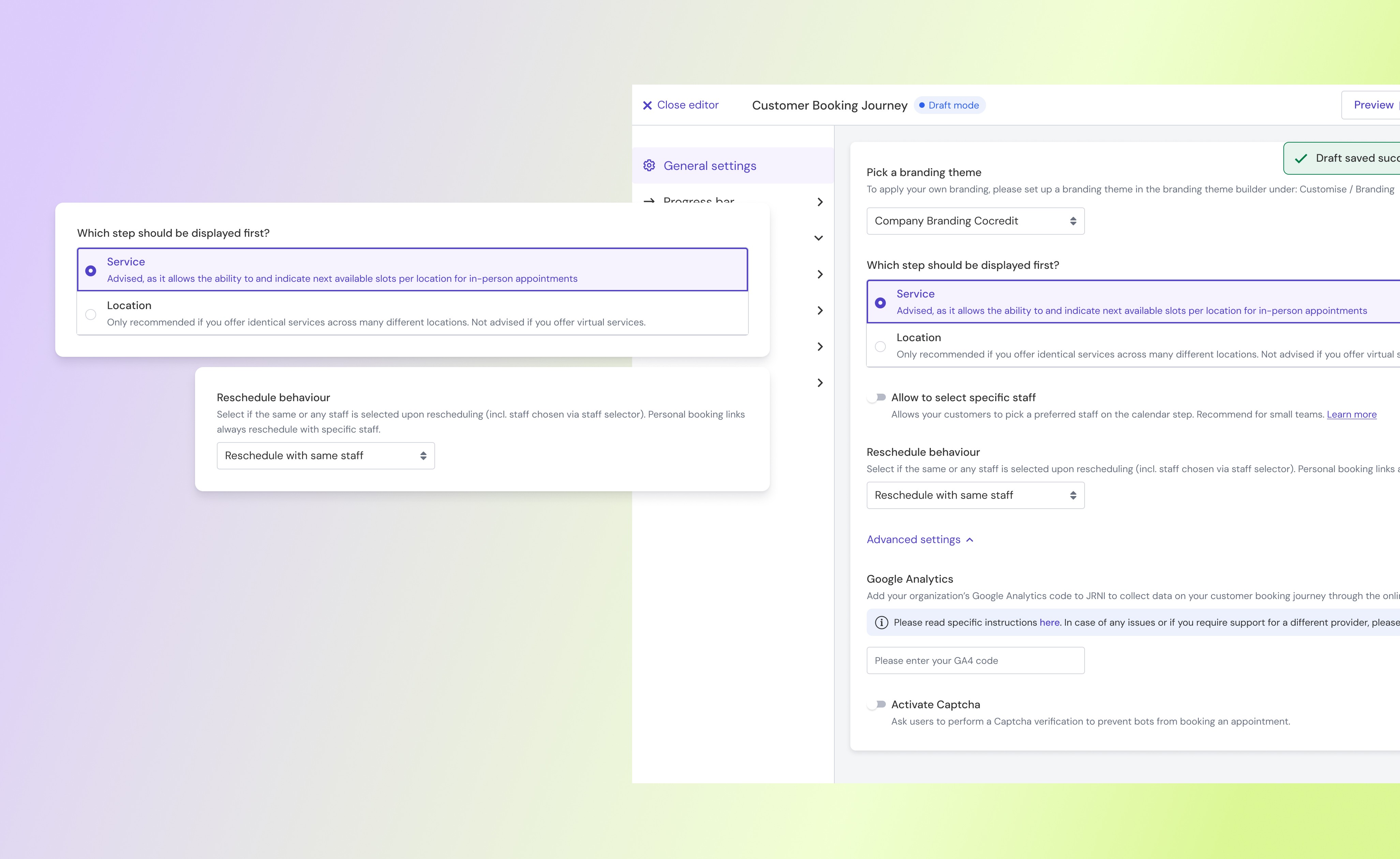
General settings


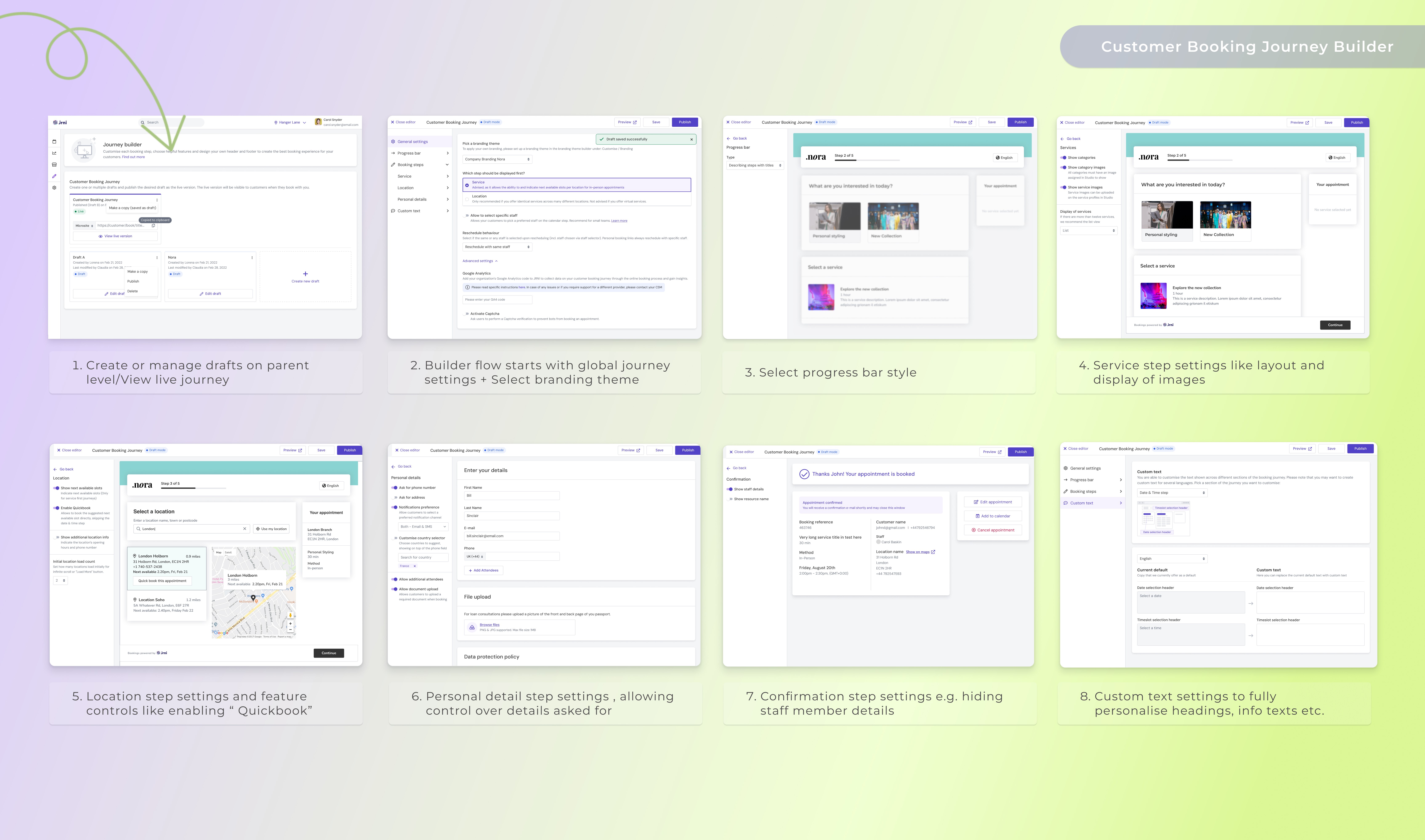
Because these settings define the global structure of a journey they are up first in the flow, examples are:

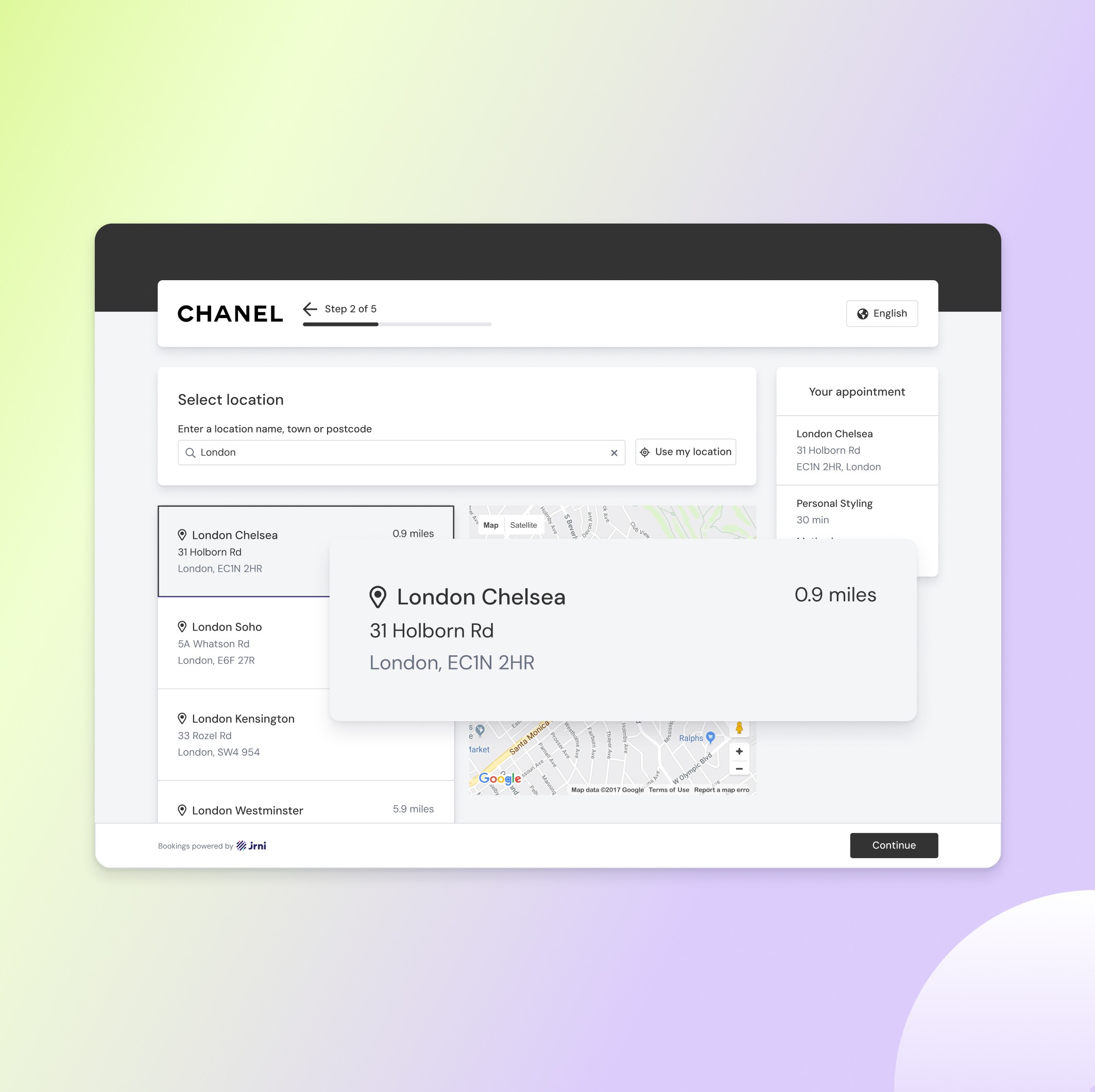
  • Different business models prioritise different entry points
    → Set journeys to start with either service or location, depending on company size and operating model.

  • Customers want to book multiple services in a single visit
    → Enabled multi-service bookings within one journey, supporting beauty and department store use cases.

  • Not all journeys require every step
    → Added the ability to skip steps when only virtual bookings are offered.

  • High-end brands enforce strict design consistency
    → Allowed custom headers and footers, driven by branding themes.

  • Rescheduling affects staff–customer relationships and booking-based permission models
    → Made reschedule behaviour configurable, allowing selection of the same vs any staff member.

General settings


Because these settings define the global structure of a journey they are up first in the flow, examples are:

  • Different business models prioritise different entry points
    → Set journeys to start with either service or location, depending on company size and operating model.

  • Customers want to book multiple services in a single visit
    → Enabled multi-service bookings within one journey, supporting beauty and department store use cases.

  • Not all journeys require every step
    → Added the ability to skip steps when only virtual bookings are offered.

  • High-end brands enforce strict design consistency
    → Allowed custom headers and footers, driven by branding themes.

  • Rescheduling affects staff–customer relationships and booking-based permission models
    → Made reschedule behaviour configurable, allowing selection of the same vs any staff member.

General settings


Because these settings define the global structure of a journey they are up first in the flow, examples are:

  • Different business models prioritise different entry points
    → Set journeys to start with either service or location, depending on company size and operating model.

  • Customers want to book multiple services in a single visit
    → Enabled multi-service bookings within one journey, supporting beauty and department store use cases.

  • Not all journeys require every step
    → Added the ability to skip steps when only virtual bookings are offered.

  • High-end brands enforce strict design consistency
    → Allowed custom headers and footers, driven by branding themes.

  • Rescheduling affects staff–customer relationships and booking-based permission models
    → Made reschedule behaviour configurable, allowing selection of the same vs any staff member.

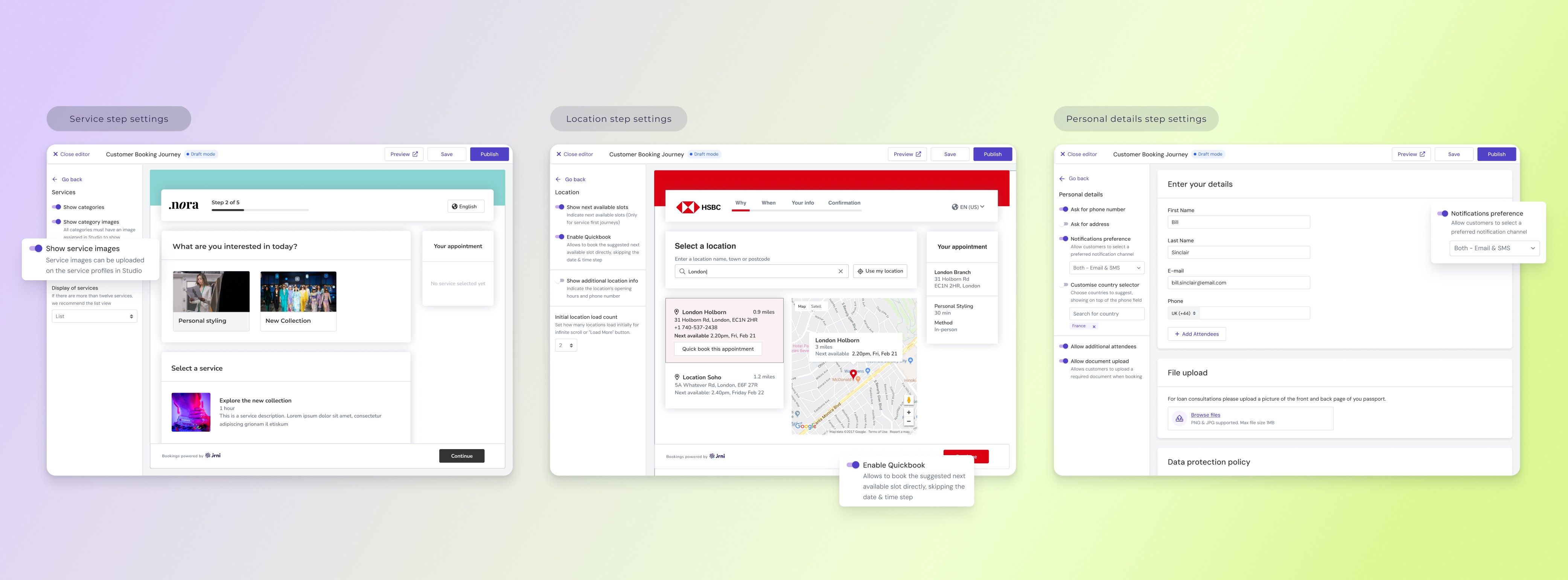
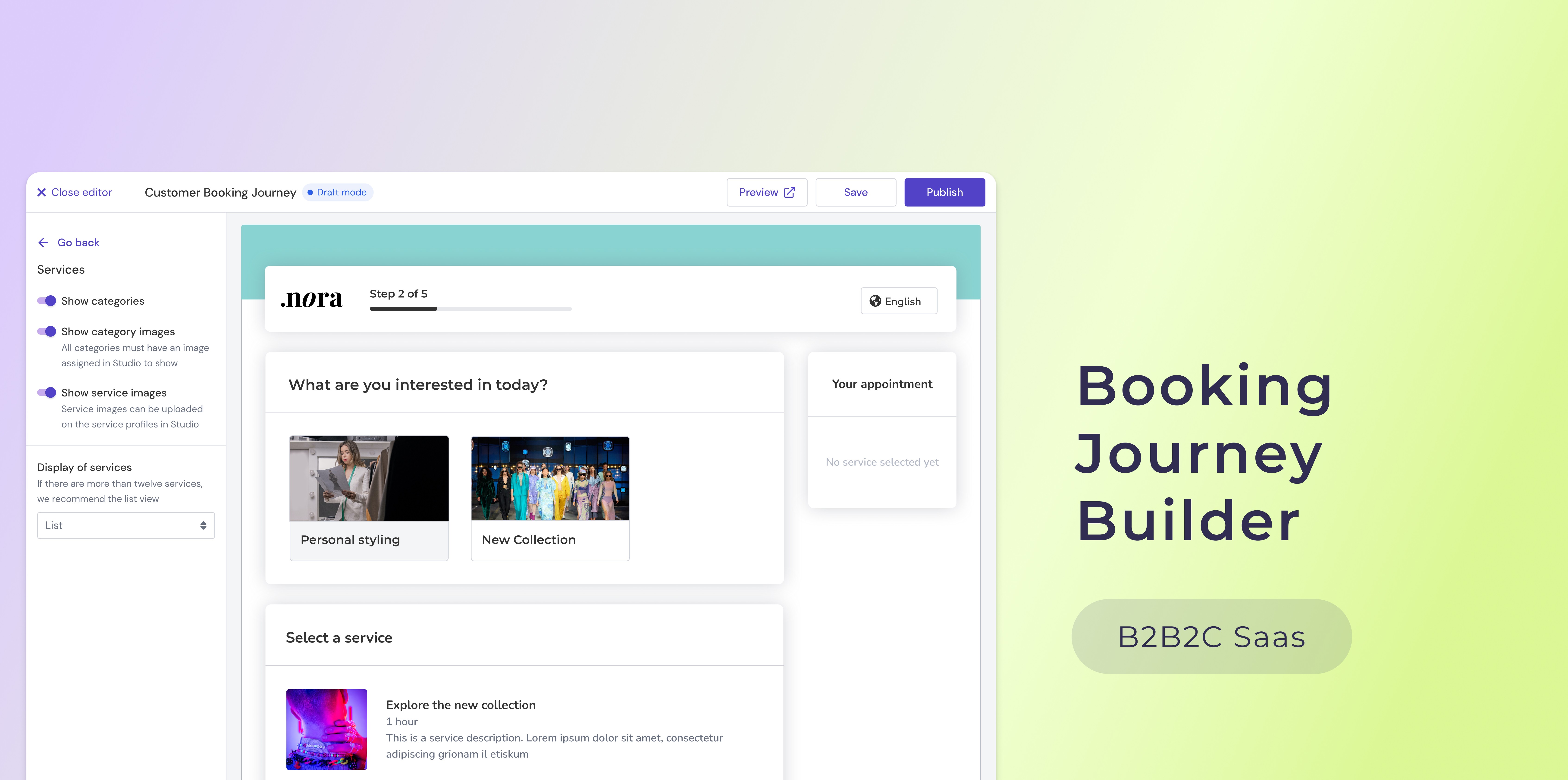
Settings per booking step

  • Immediate visual feedback for step settings
    → Split step-level settings into their own section with an in-app preview next to it, so admins can see the effect immediately without running a dummy booking each time.

  • Different service presentation preferences
    → Allowed card vs. list view and optional service images, based on research showing that customers with many services prefer list views for efficiency, while smaller portfolios value visual imagery.

  • Faster time slot selection
    → When enabled, this feature shows the next available slot and lets customers skip the date and time step, going straight to entering personal details, reducing clicks and time

  • Customisable personal details collection
    → Enabled enterprises to configure which fields are required, optional, or include notifications, reflecting strict internal policies and varying requirements.

  • Flexible confirmation step information
    → Allowed showing or hiding staff details, catering to privacy or security needs in sensitive industries like finance.

Settings per booking step

  • Immediate visual feedback for step settings
    → Split step-level settings into their own section with an in-app preview next to it, so admins can see the effect immediately without running a dummy booking each time.

  • Different service presentation preferences
    → Allowed card vs. list view and optional service images, based on research showing that customers with many services prefer list views for efficiency, while smaller portfolios value visual imagery.

  • Faster time slot selection
    → When enabled, this feature shows the next available slot and lets customers skip the date and time step, going straight to entering personal details, reducing clicks and time

  • Customisable personal details collection
    → Enabled enterprises to configure which fields are required, optional, or include notifications, reflecting strict internal policies and varying requirements.

  • Flexible confirmation step information
    → Allowed showing or hiding staff details, catering to privacy or security needs in sensitive industries like finance.

Settings per booking step

  • Immediate visual feedback for step settings
    → Split step-level settings into their own section with an in-app preview next to it, so admins can see the effect immediately without running a dummy booking each time.

  • Different service presentation preferences
    → Allowed card vs. list view and optional service images, based on research showing that customers with many services prefer list views for efficiency, while smaller portfolios value visual imagery.

  • Faster time slot selection
    → When enabled, this feature shows the next available slot and lets customers skip the date and time step, going straight to entering personal details, reducing clicks and time

  • Customisable personal details collection
    → Enabled enterprises to configure which fields are required, optional, or include notifications, reflecting strict internal policies and varying requirements.

  • Flexible confirmation step information
    → Allowed showing or hiding staff details, catering to privacy or security needs in sensitive industries like finance.

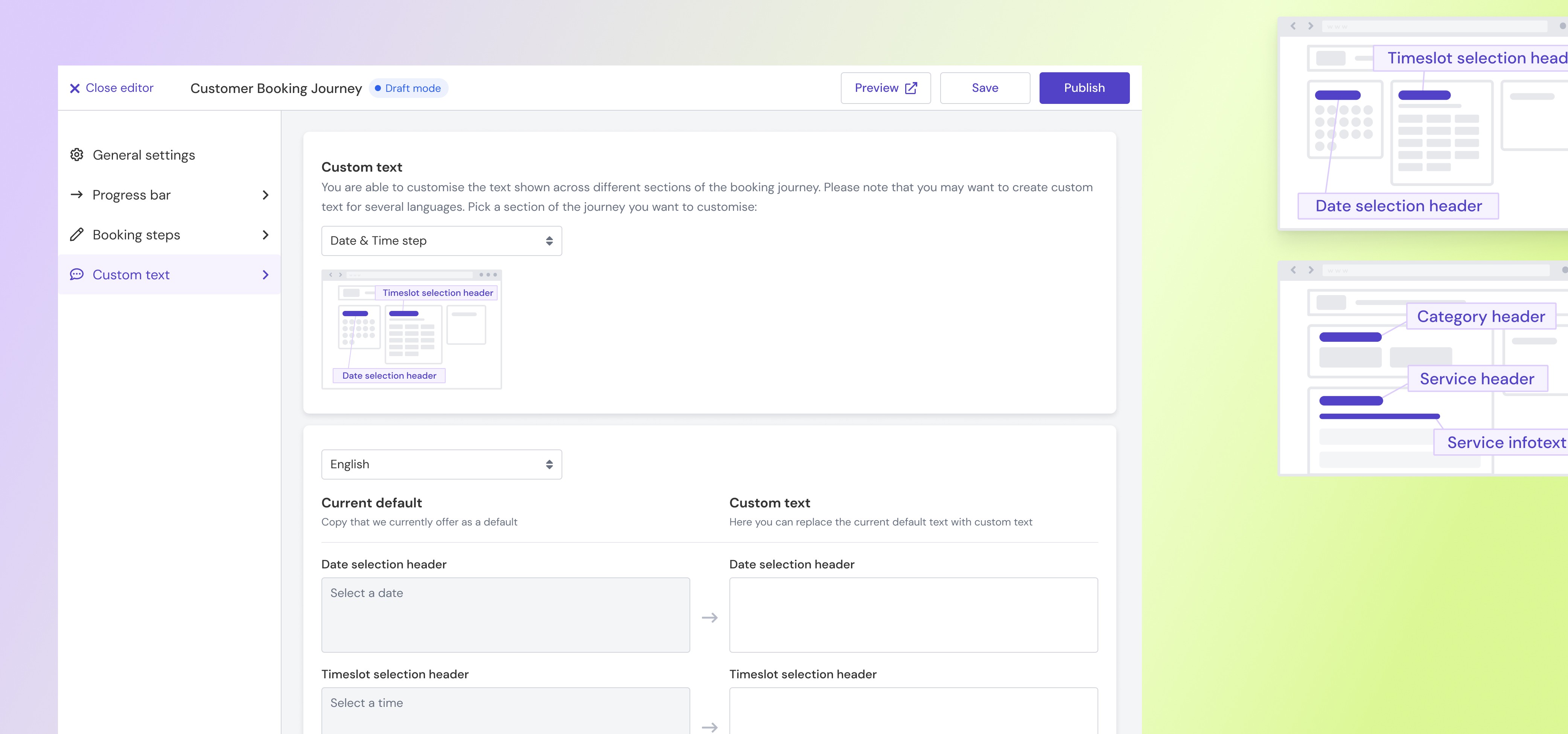
Custom texts

  • Admins need full control over journey wording
    → Provides a dedicated section to edit or customise text, giving admins complete flexibility and reducing work for our internal implementation teams.

  • Admins struggled to know exactly which text they were changing
    → Added step-by-step illustrations and titles in the Custom Text section, showing where each piece of text appears in the journey so users clearly understand what they are editing.

Custom texts

  • Admins need full control over journey wording
    → Provides a dedicated section to edit or customise text, giving admins complete flexibility and reducing work for our internal implementation teams.

  • Admins struggled to know exactly which text they were changing
    → Added step-by-step illustrations and titles in the Custom Text section, showing where each piece of text appears in the journey so users clearly understand what they are editing.

Custom texts

  • Admins need full control over journey wording
    → Provides a dedicated section to edit or customise text, giving admins complete flexibility and reducing work for our internal implementation teams.

  • Admins struggled to know exactly which text they were changing
    → Added step-by-step illustrations and titles in the Custom Text section, showing where each piece of text appears in the journey so users clearly understand what they are editing.

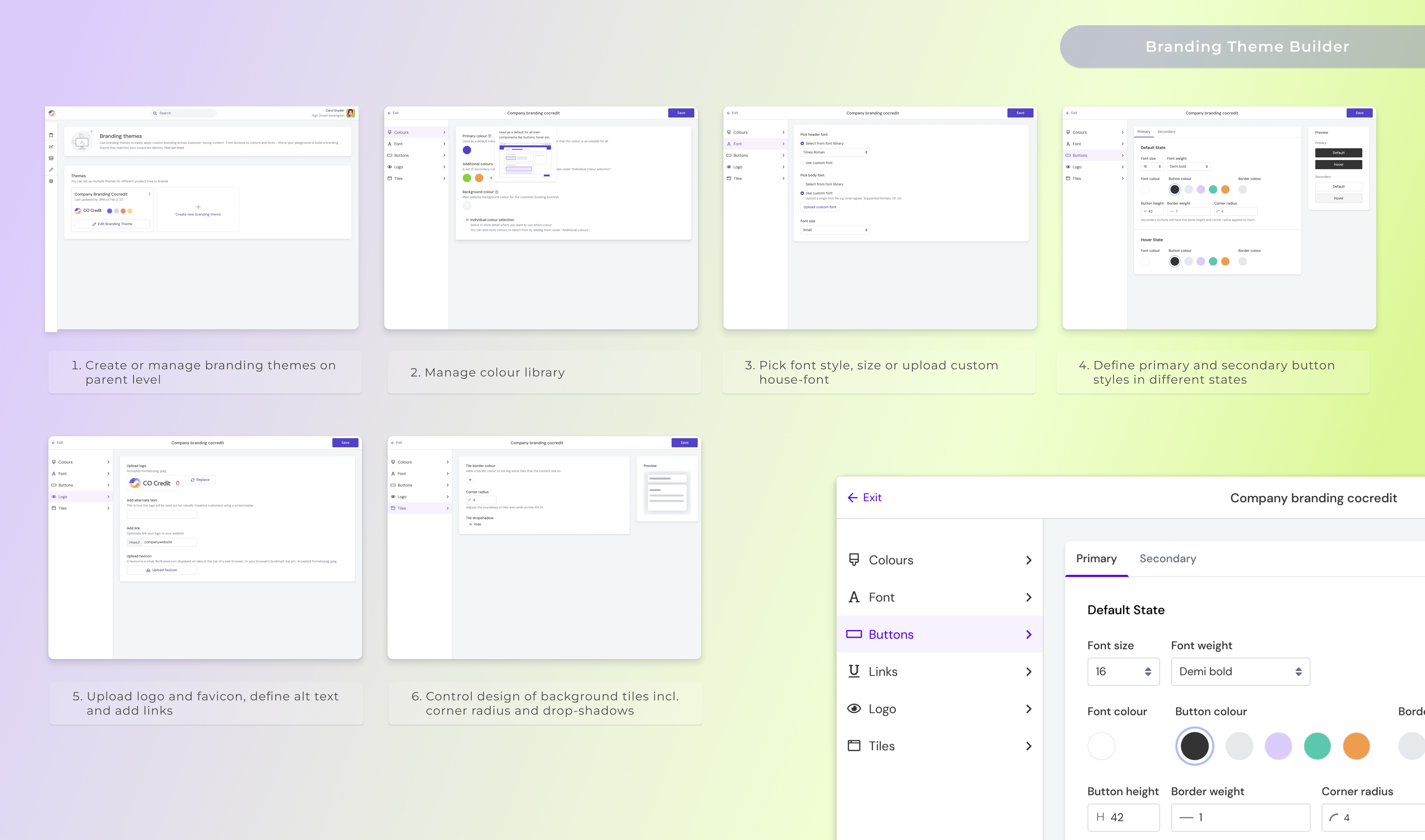
Branding themes


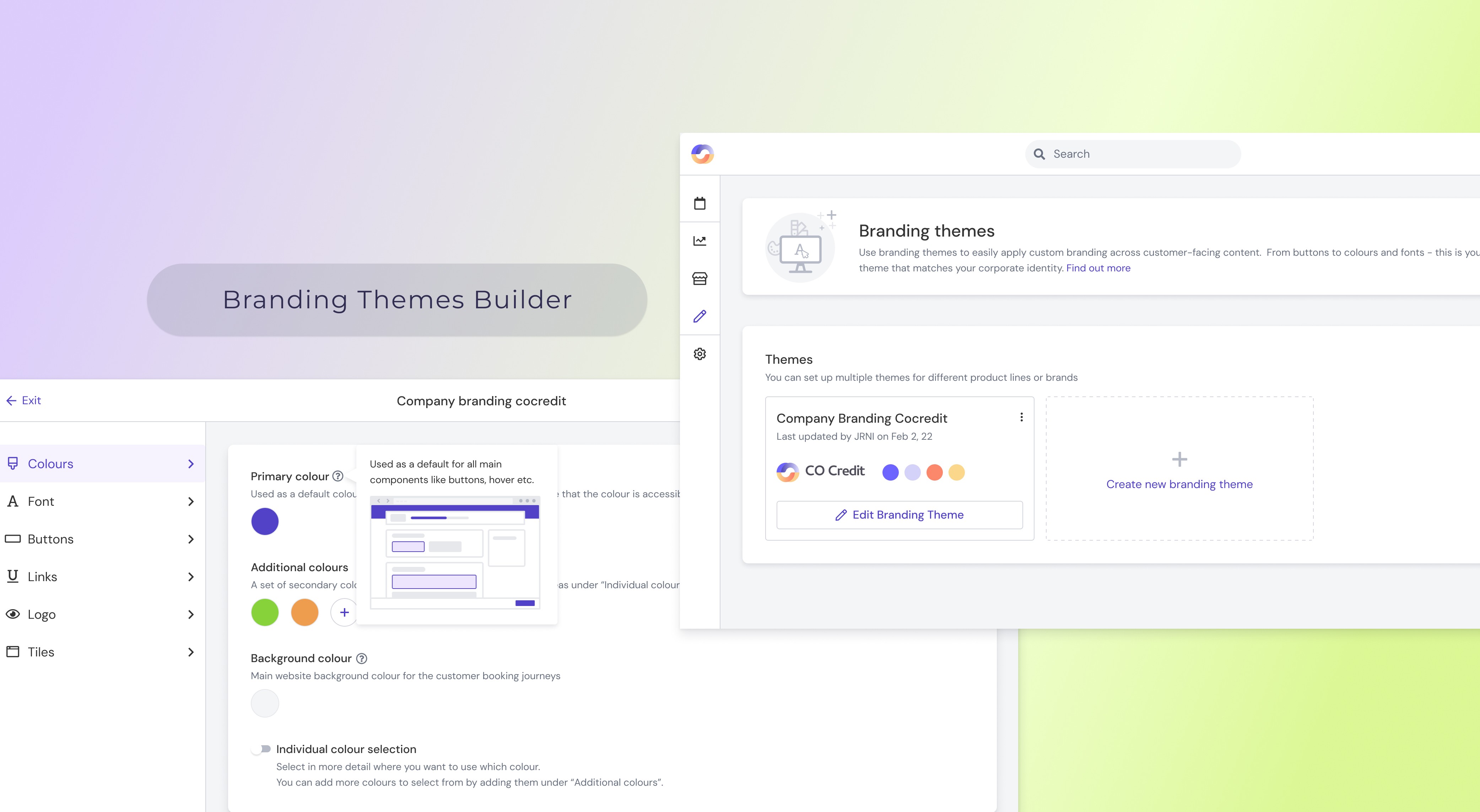
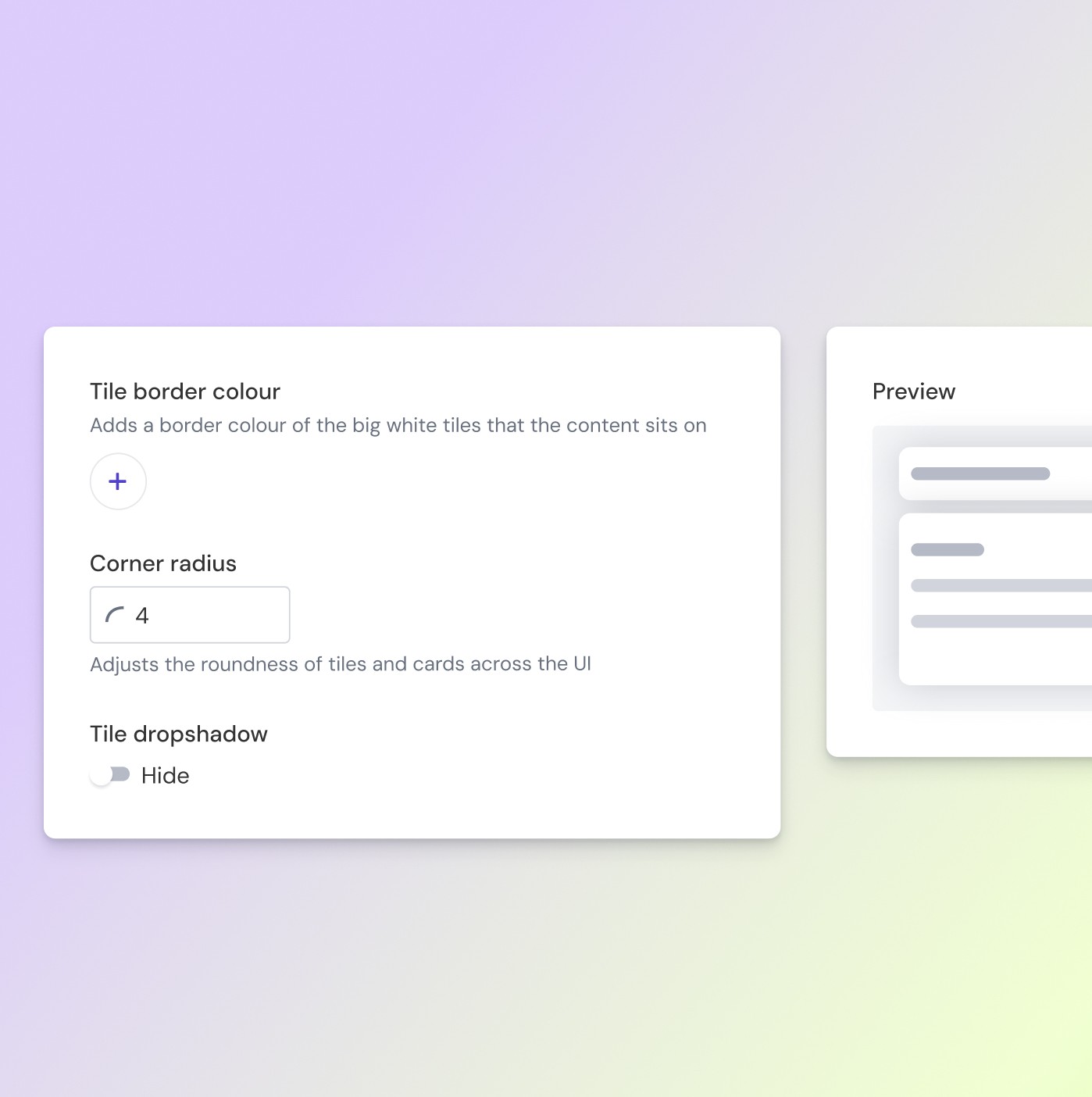
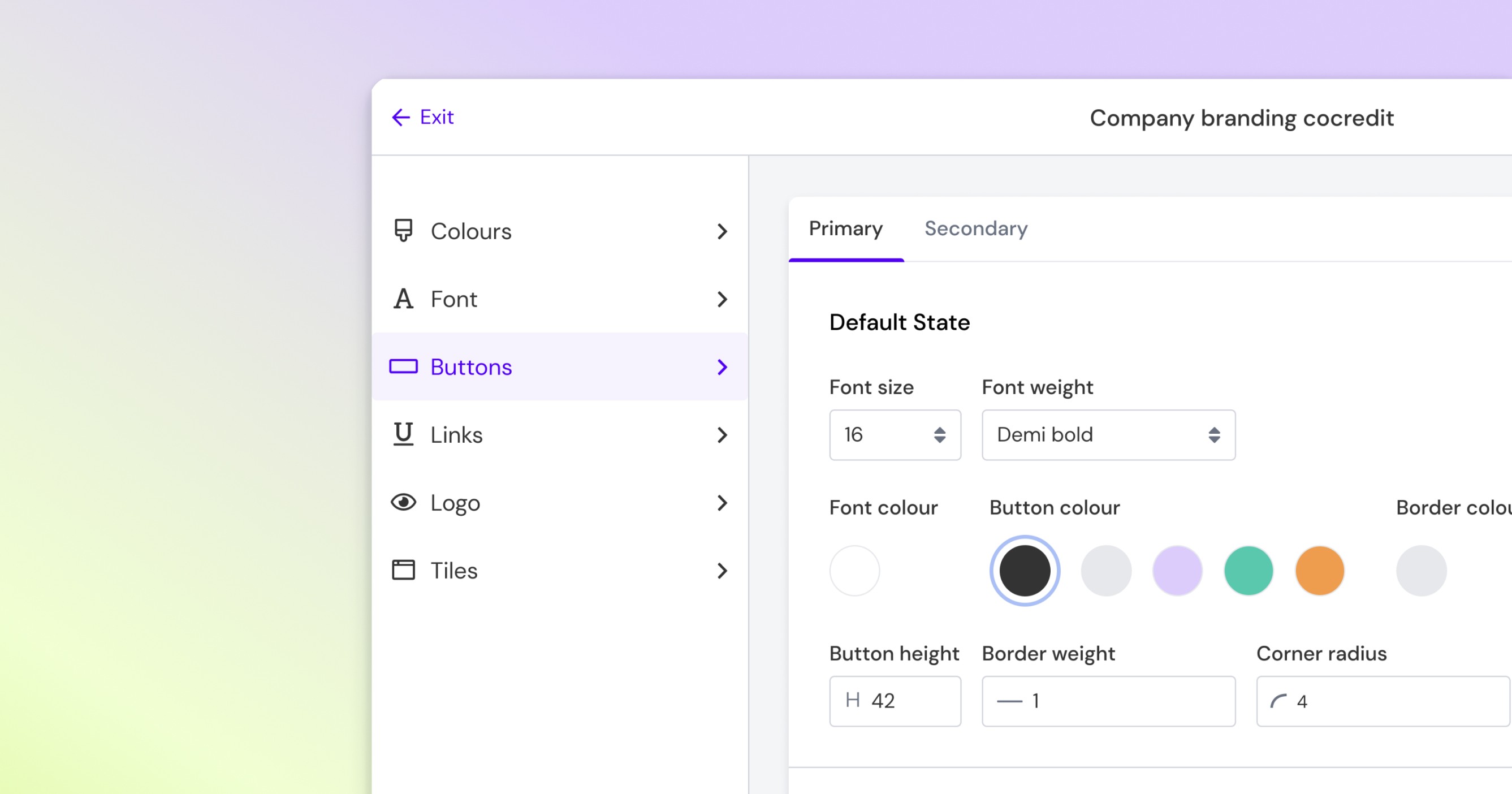
I identified that branding needed to be fully separated from individual journeys, so I created Branding Themes as a separate tool to avoid having to define styles over and over again for future products like emails, SMS, and event journeys. This strategic shift moved the product from a feature-by-feature mindset to a system-based approach, enabling efficiency, consistency, and long-term scalability.
_______________

Roll-out


I led a comprehensive rollout to ensure both customers and internal teams could use Journey Builder effectively. I created HelpDocs, ran training sessions with CSMs, and worked with Marketing on announcement emails. Early design drop-ins gathered feedback from all internal teams, even in departments where we hadn’t formally done research.

I hosted a live webinar for all customers, presented in larger sessions like the Customer Advisory Board, and developed a rollout plan with CSMs based on customer version, upgrade paths and satisfaction. Internally, I supported adoption with training material and documentation so teams could confidently sell and support.

_______________

Outcome

Outcome

Outcome

90%

...of existing customers adopted the new journeys within a year

3

...new enterprise clients were won shortly after demoing the builder

+18%

...improvement in CSAT.-Customer satisfaction increased

The implementation time was reduced by

~65%

Self-serve adoption lowered support load by

25–35%

Journeys & builder were migrated /built with React

Performance & security
________
Learnings

Working on the Journey Builder was a defining moment in my career - a large, complex project that I led from start to finish. It pushed me beyond my comfort zone and into real product ownership.


This project gave me a much deeper understanding of product management: how to prioritise, how to navigate trade-offs, how to make decisions more strategically- even under ambiguity, and how to keep teams motivated and aligned even when resources are tight and timelines are firm. I learned to balance user needs, business goals, and internal interests- something that popped my idealistic little UX bubble and gave me a more realistic view of what it takes to make good products in the wild.
I also discovered how AI, while never replacing user research or strategic thinking, can speed up design and copywriting tasks a lot!

________

Learnings

Working on the Journey Builder was a defining moment in my career — a large, complex project that I led from start to finish. It pushed me beyond my comfort zone and into real product ownership.


This project gave me a much deeper understanding of product management: how to prioritise, how to navigate trade-offs, how to make decisions more strategically- even under ambiguity, and how to keep teams motivated and aligned even when resources are tight and timelines are firm. I learned to balance user needs, business goals, and internal interests — something that popped my idealistic little UX bubble and gave me a more realistic view of what it takes to make good products in the wild.
I also discovered how AI, while never replacing user research or strategic thinking, can speed up design and copywriting tasks a lot!

________

Learnings

Working on the Journey Builder was a defining moment in my career — a large, complex project that I led from start to finish. It pushed me beyond my comfort zone and into real product ownership.


This project gave me a much deeper understanding of product management: how to prioritise, how to navigate trade-offs, how to make decisions more strategically- even under ambiguity, and how to keep teams motivated and aligned even when resources are tight and timelines are firm. I learned to balance user needs, business goals, and internal interests — something that popped my idealistic little UX bubble and gave me a more realistic view of what it takes to make good products in the wild.
I also discovered how AI, while never replacing user research or strategic thinking, can speed up design and copywriting tasks a lot!