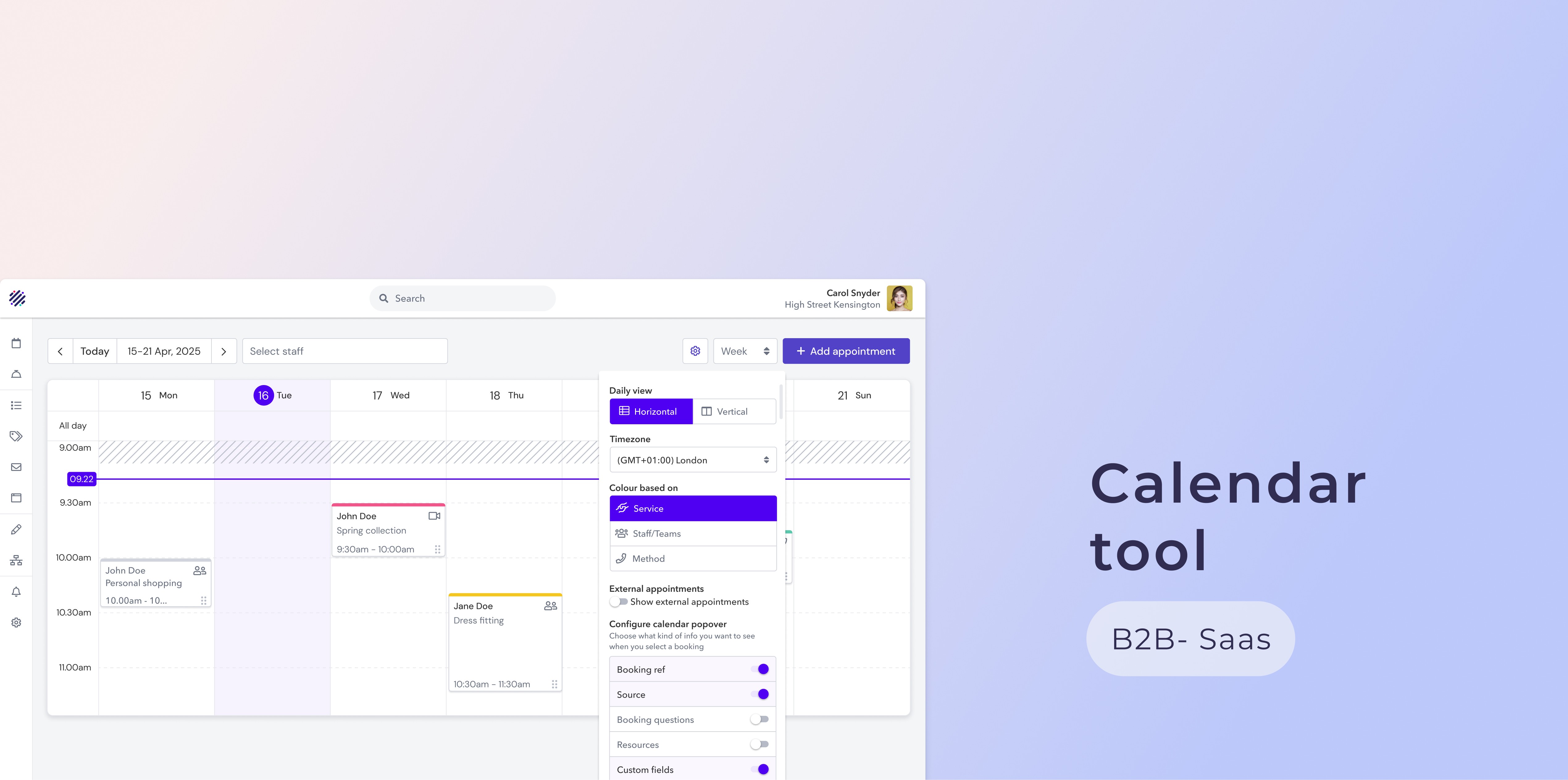
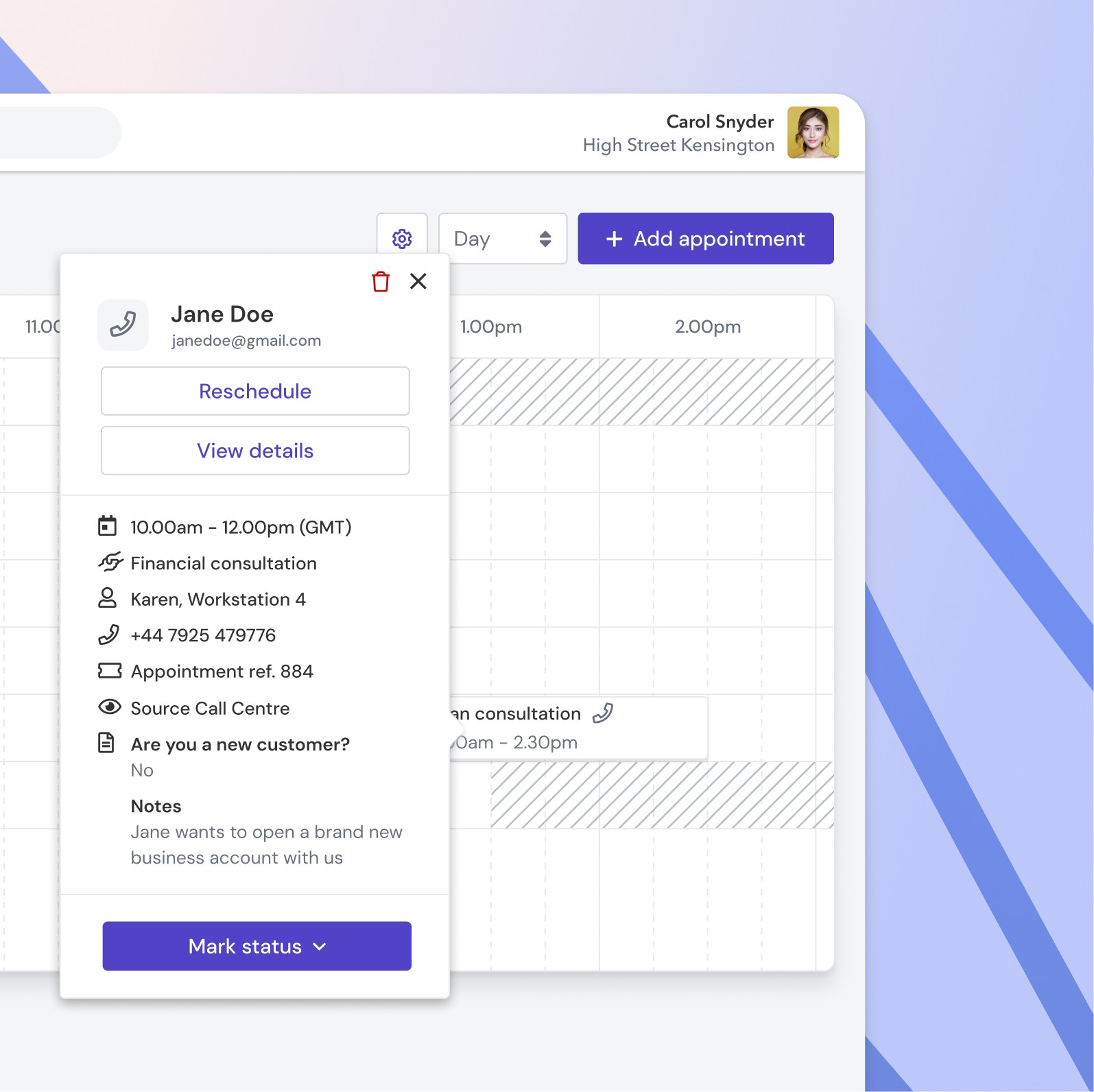
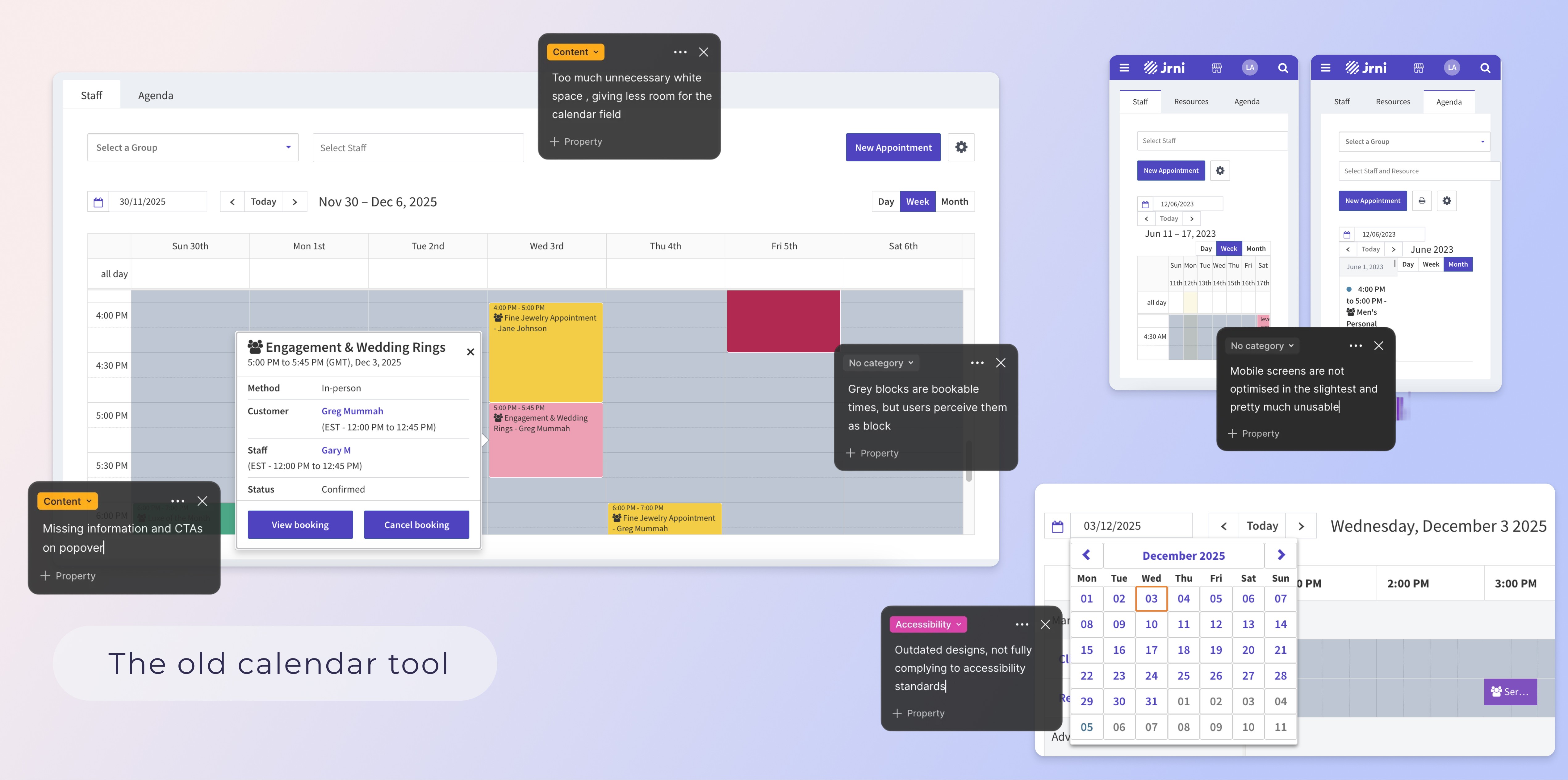
The calendar tool is used by the staff of our customers , typically roles like finance advisors or shop floor advisors in retail , to view their upcoming bookings and prepare for them by checking the guest details or booking questions , manage them (reschedule and cancel) or to add new bookings themselves. A booking can run through different statuses (e.g. customer arrived, -is being seen, -has been served) which is manually marked by staff.
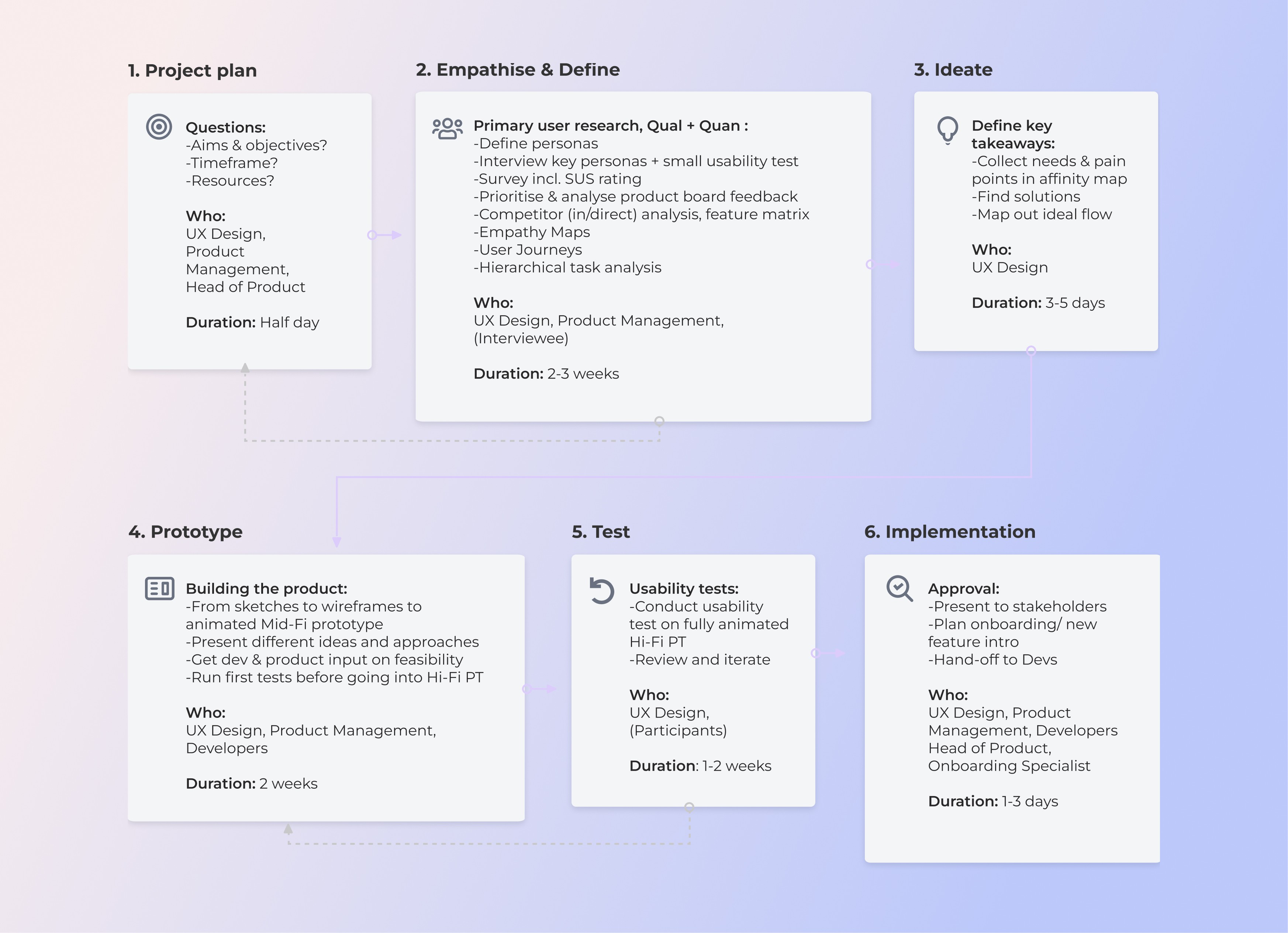
I split my discovery-deep dive of the tool into primary and secondary research , using quantitative and qualitative methods to make sure to get a holistic picture of all the needs and pain points. I followed the standard design thinking process to tackle the problem.
_______________
Discovery
Project Process Plan
Secondary research
Internal interviews (IM, CS, PS, product, and sales) to get a first understanding of users and their frustrations
Collected all known customer RFE's (request for enhancements) from tickets and "Productboard" platform
Ran a persona-workshop with all relevant internal stakeholders to define the different user groups
Analysed direct and indirect competitor tools to understand market expectations and gaps
Primary research
Recruited and interviewed 4 enterprise customers in finance and retail (ANZ,HSBC, Urban Outfitters, Room&Board) with HQ staff/admins to understand their requirements from a mgmt perspective and put feedback into context
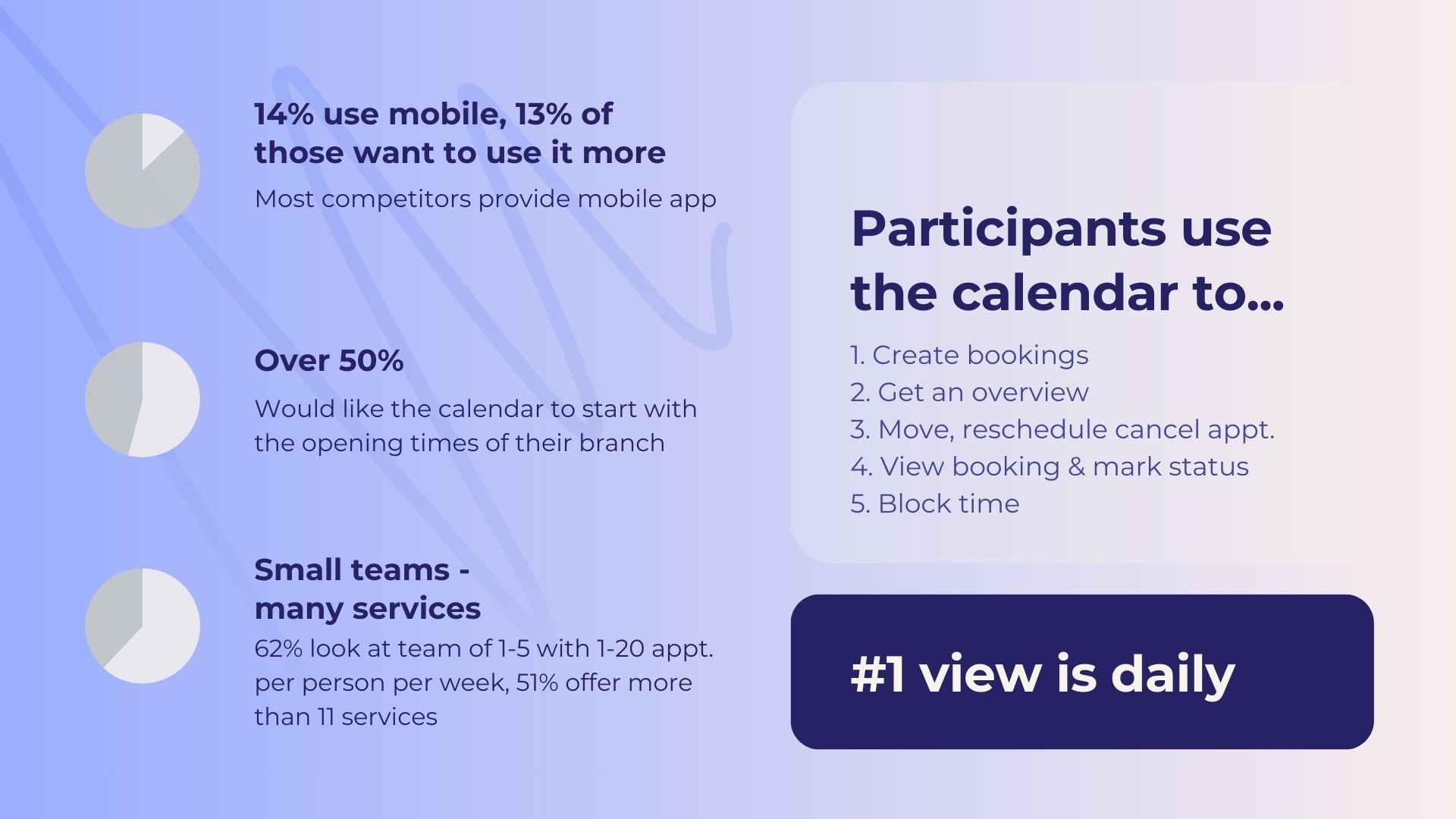
Send out a survey via Pendo across our entire customer pool targeting all primary end users of the calendar to detect broadly applicable needs/frustrations dependent on their role and back up use cases in numbers
Assessed usability using the SUS (System usability scale) framework as part of the survey to measure subjective factors like satisfaction
Conducted a small usability tests on web and mobile for benchmarking, complying with CIF, measuring efficiency/effectiveness of the old and the redesigned calendar via time-, error-, assist- and task success rate
Secondary research
Internal interviews (IM, CS, PS, product, and sales) to get a first understanding of users and their frustrations
Collected all known customer RFE's (request for enhancements) from tickets and "Productboard" platform
Ran a persona-workshop with all relevant internal stakeholders to define the different user groups
Analysed direct and indirect competitor tools to understand market expectations and gaps
Primary research
Recruited and interviewed 4 enterprise customers in finance and retail (ANZ,HSBC, Urban Outfitters, Room&Board) with HQ staff/admins to understand their requirements from a mgmt perspective and put feedback into context
Send out a survey via Pendo across our entire customer pool targeting all primary end users of the calendar to detect broadly applicable needs/frustrations dependent on their role and back up use cases in numbers
Assessed usability using the SUS (System usability scale) framework as part of the survey to measure subjective factors like satisfaction
Conducted a small usability test for benchmarking, complying with CIF, measuring efficiency and effectiveness of the old and the redesigned calendar via time-, error-, assist- and task success rate
Secondary research
Internal interviews (IM, CS, PS, product, and sales) to get a first understanding of users and their frustrations
Collected all known customer RFE's (request for enhancements) from tickets and "Productboard" platform
Ran a persona-workshop with all relevant internal stakeholders to define the different user groups
Analysed direct and indirect competitor tools to understand market expectations and gaps
Primary research
Recruited and interviewed 4 enterprise customers in finance and retail (ANZ,HSBC, Urban Outfitters, Room&Board) with HQ staff/admins to understand their requirements from a mgmt perspective and put feedback into context
Send out a survey via Pendo across our entire customer pool targeting all primary end users of the calendar to detect broadly applicable needs/frustrations dependent on their role and back up use cases in numbers
Assessed usability using the SUS (System usability scale) framework as part of the survey to measure subjective factors like satisfaction
Conducted a small usability test for benchmarking, complying with CIF, measuring efficiency and effectiveness of the old and the redesigned calendar via time-, error-, assist- and task success rate
"It's not possible to find out the booking method (in-person/phone/video) by scanning the calendar. It takes me multiple clicks - this really slows me down"
-HSBC
"What do all the different colours mean? There seems to be no meaning to them. The colours remind me of Windows 2000"
-Room & Board
"You need to allow for the booking section (the actual calendar field) to be bigger. It's tiny and I need to scroll too much "
-ANZ
Competitor research
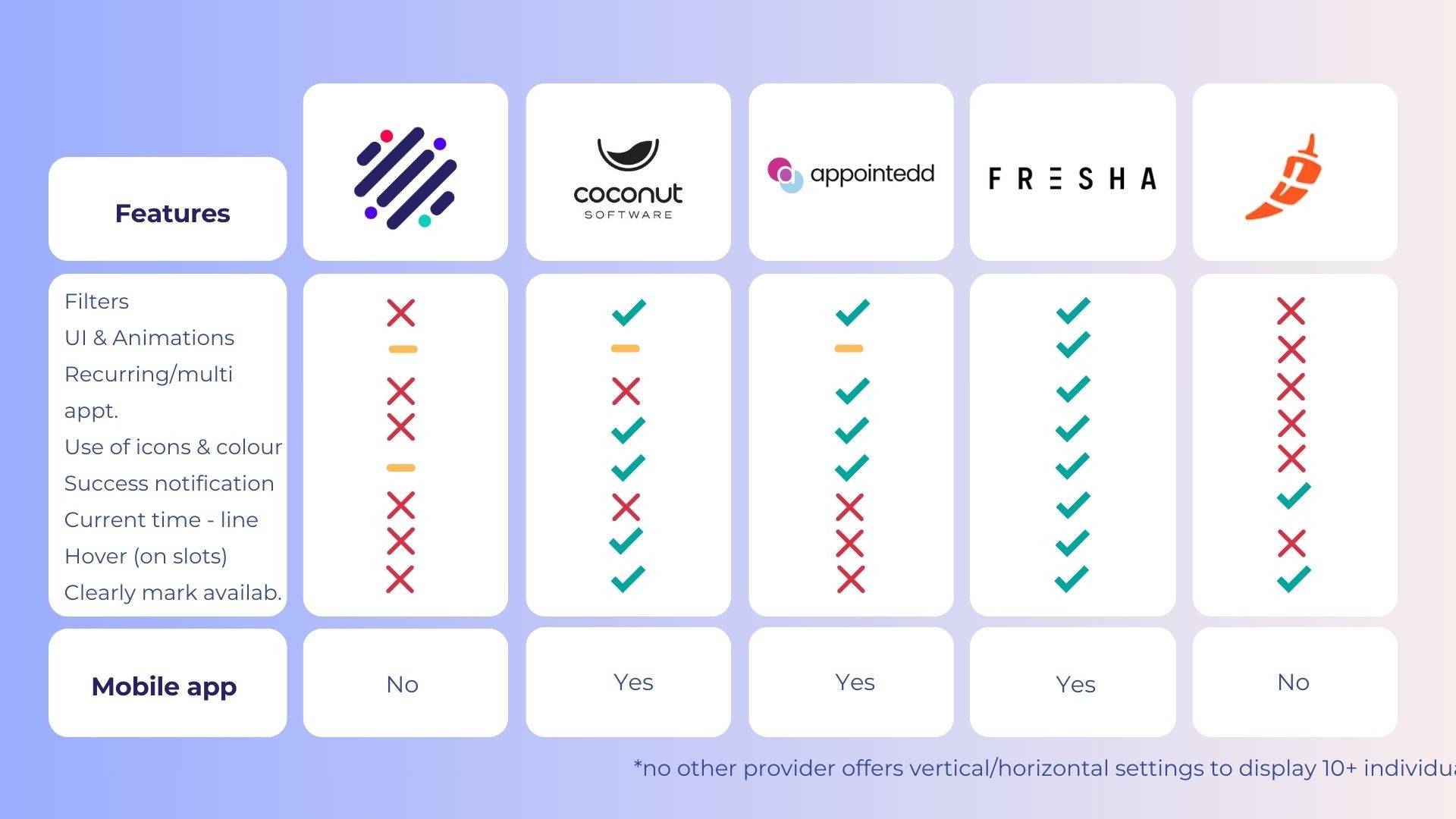
I researched direct competitors and also added some indirect competitors with strong tools that I draw a lot of inspiration from. After gaining access to a demo version of their product I created a list of tasks and other rating factors that I compared across the tools. After this I created a battle card for each competitor highlighting their best features (with images) and stating the key strengths and weaknesses.
A feature comparison table of all competitors and jrni then helped to get a quick overview of where we were falling short.
Persona workshop
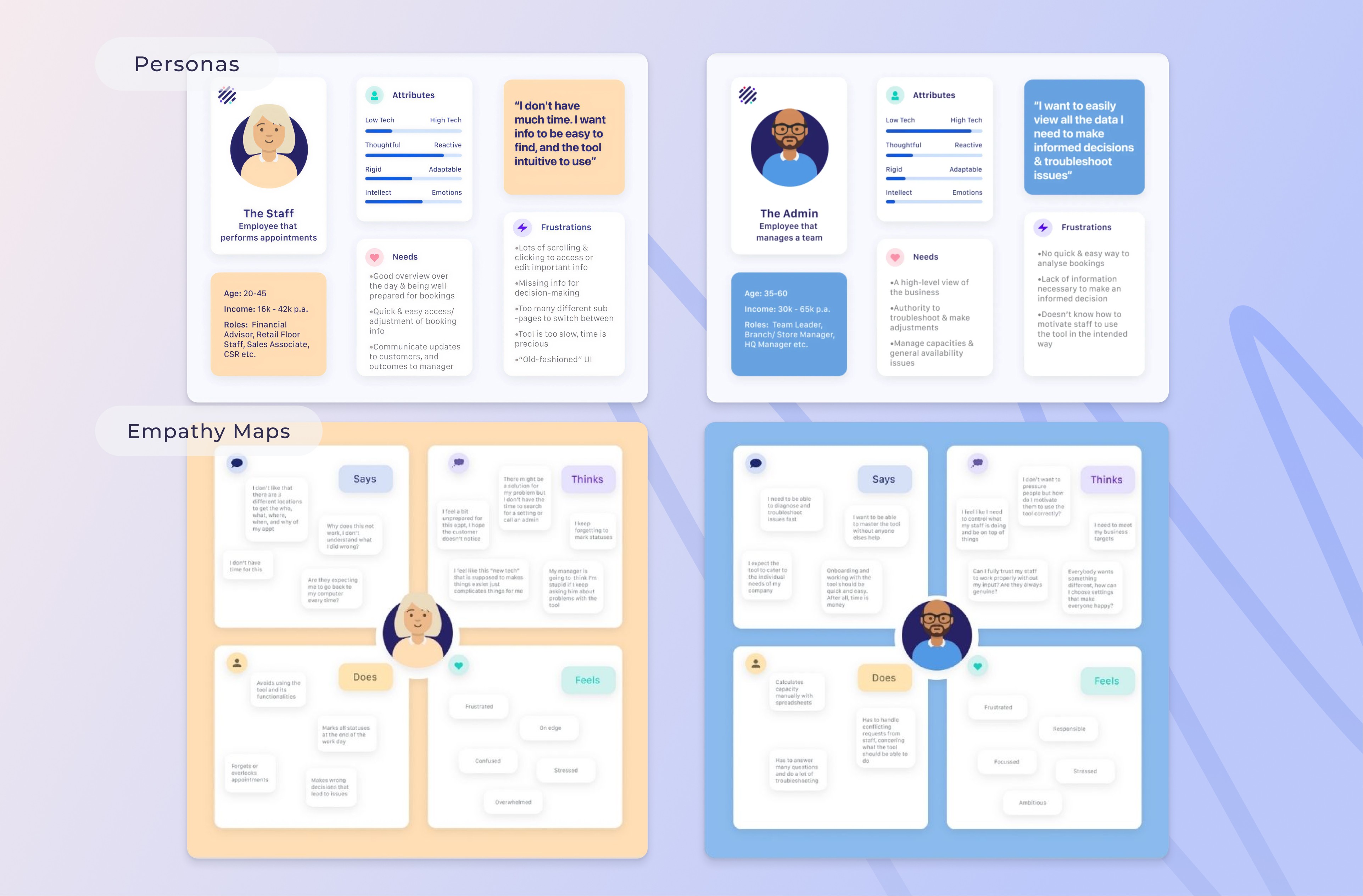
To get a better idea of the different kind of personas using the calendar, and to design a solution based on their individual needs and pain points I led a persona workshop.
I invited 5 colleges from our product team who had years of experience and insights working with the different stakeholders. Using the online whiteboard tool Miro I asked them to collect pains and gains for the 3 main use cases and rate soft attributes for both personas - George the finance admin and Grace the floor staff.
______________
Key product decisions
Based on the workshop insights , I was able to create two defined personas and empathy maps that informed my future designs and decisions.
Key findings user research
The findings below capture the main themes that consistently came up across my research methods. The survey was especially useful beyond this project, helping build a clearer picture of customer team structures, service setups, and the key actions users take in the product, which directly informed prioritisation and layout decisions. The SUS rating of the existing/old calendar scored 68.2, placing it in the “okay” range and reinforcing the need for improvement.
Calendar field too small
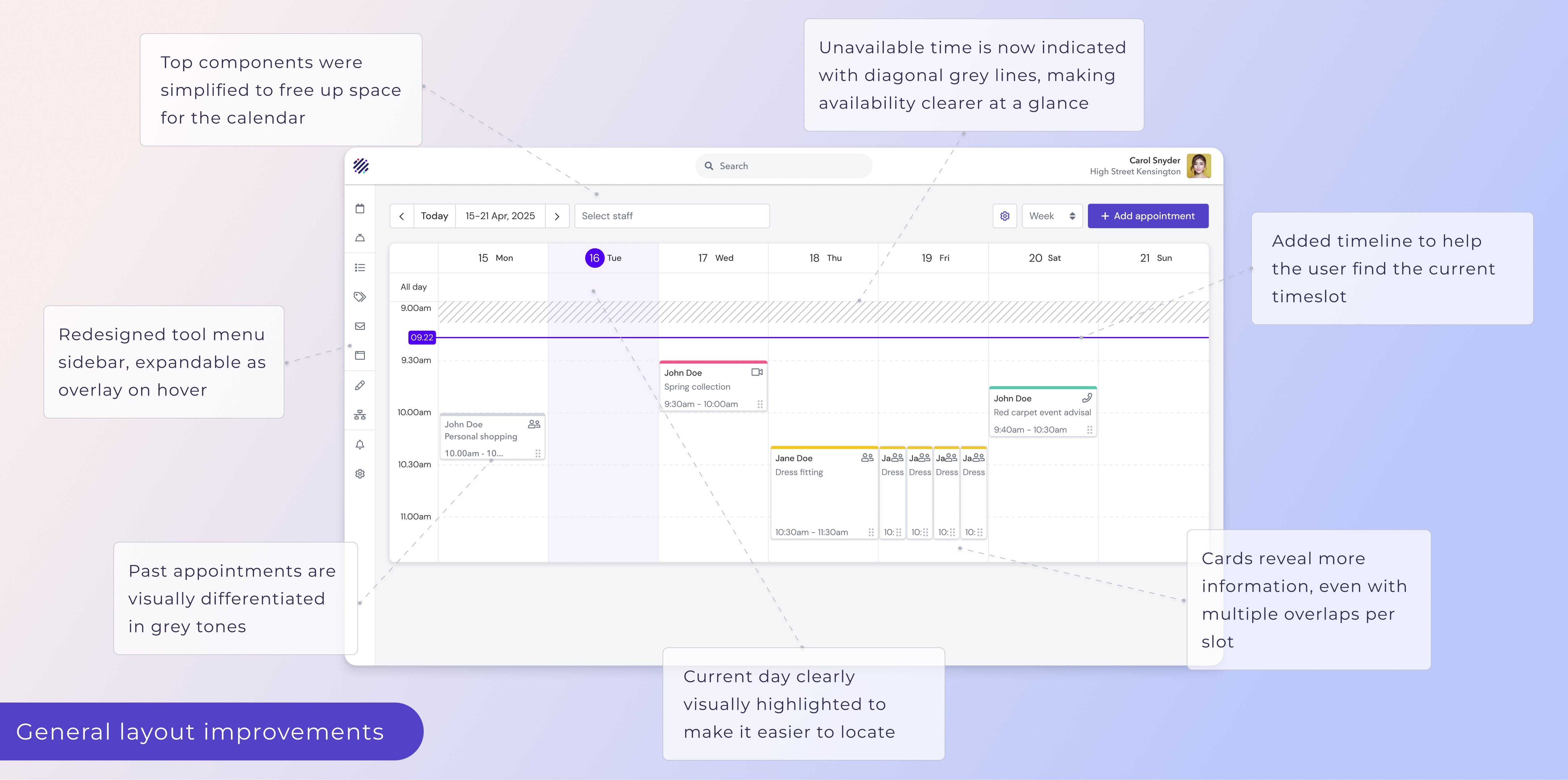
The actual calendar field is too small, requires lots of scrolling and cannot be scanned
👉Rearrange components to create space, improve slot card
Default start/end-times off
The calendar starts at 0:00am, requiring a lot of scrolling
👉The start/end times of the calendar should reflect actual use cases, add setting
Availability display unclear
Available time blocks are coloured grey, users expect the opposite
👉Clearly mark unavailable slots
Booking popover lacking
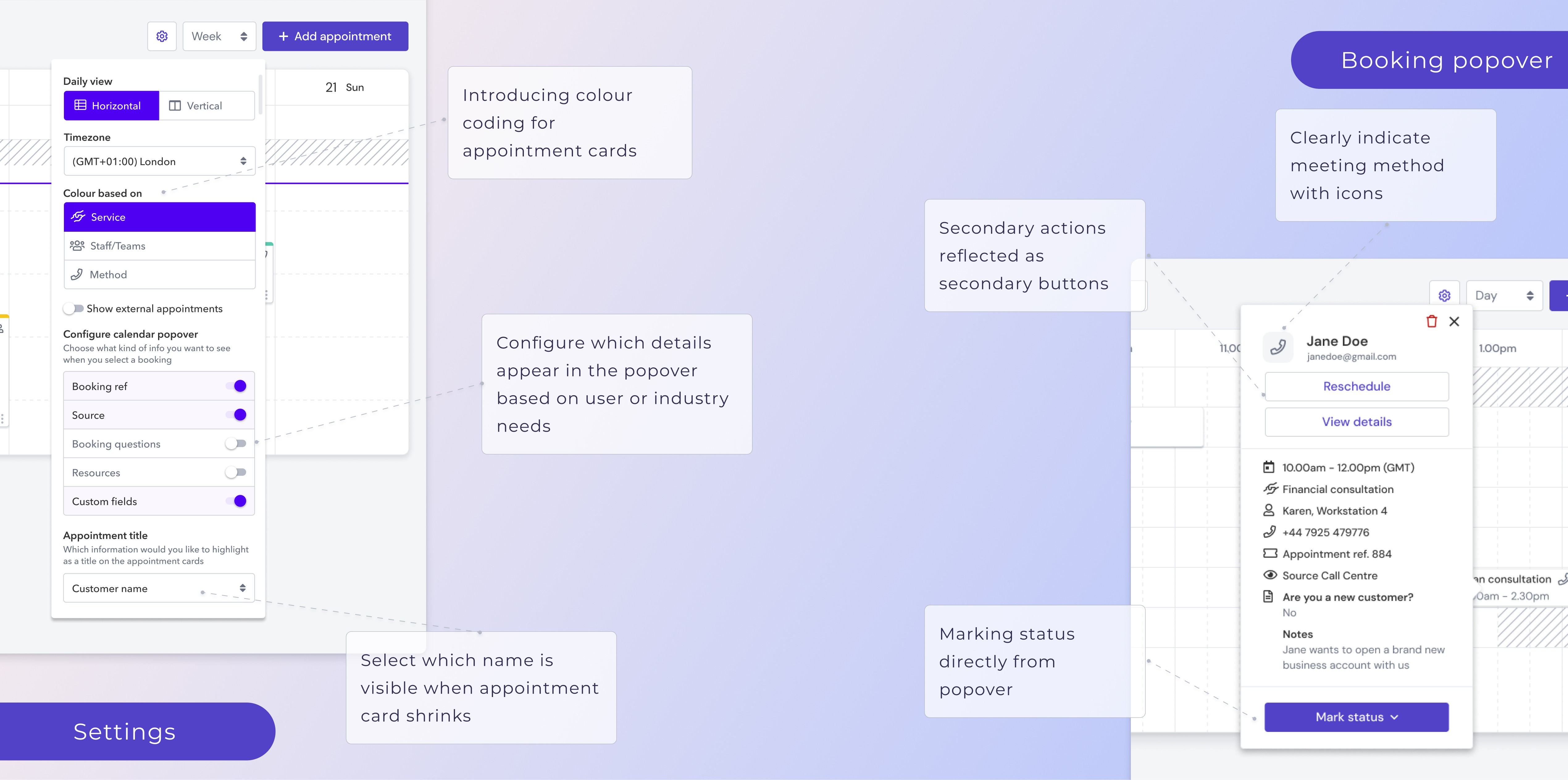
Some infos are irrelevant, others like meeting method (in-person/phone/video) or updating statuses are missing
👉Configurable setting for what's shown on the popover
No colour coding
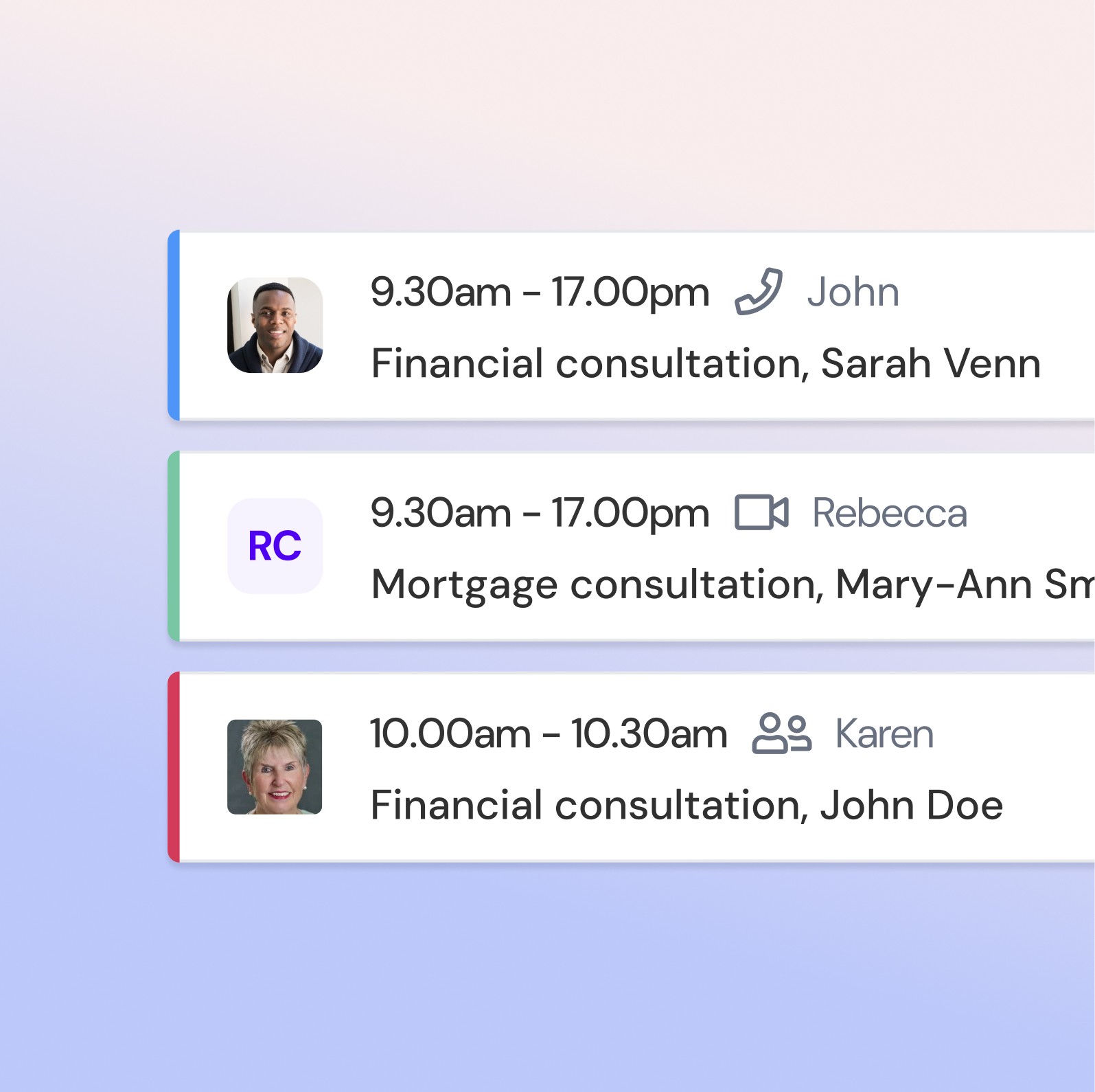
The colours for appt cards are random, causing confusion, users also dislike the colours
👉Set colour-coding dependent on service type/ booking method/ staff/ status
Lack of visual indicators
The calendar is lackimng responsiveness & it is difficult to locate the current date
👉Add more mico-animations like slot hover, drag &drop, current time line
Blocking time cumbersome
Blocking time for multiple staff is time intense
👉Create better blocking flow and allow repeating- & multi staff blocks
Filters
Users want to see only relevant staff and appts, more easily
👉Add staff and service status filters to find relevant appts
Check-in's should be added
There is a separate tool for check-ins and users dislike having to switch these
👉Allow check-ins in the agenda view
Calendar field too small
The actual calendar field is too small, requires lots of scrolling and cannot be scanned
👉Rearrange components to create space, improve slot card
Default start/end-times off
The calendar starts at 0:00am, requiring a lot of scrolling
👉The start/end times of the calendar should reflect actual use cases, add setting
Availability display unclear
Available time blocks are coloured grey, users expect the opposite
👉Clearly mark unavailable slots
Booking popover lacking
Some infos are irrelevant, others like meeting method (in-person/phone/video) or updating statuses are missing
👉Configurable setting for what's shown on the popover
No colour coding
The colours for appt cards are random, causing confusion, users also dislike the colours
👉Set colour-coding dependent on service type/ booking method/ staff/ status
Lack of visual indicators
The calendar is lacking responsiveness & it is difficult to locate the current date👉Add more mico-animations like slot hover, drag &drop, current time line
Blocking time cumbersome
Blocking time for multiple staff is time intense
👉Create better blocking flow and allow repeating- & multi staff blocks
Filters
Users want to see only relevant staff and appts, more easily
👉Add staff and service status filters to find relevant appts
Check-in's should be added
There is a separate tool for check-ins and users dislike having to switch these
👉Allow check-ins in the agenda view
_______________
Mobile Design
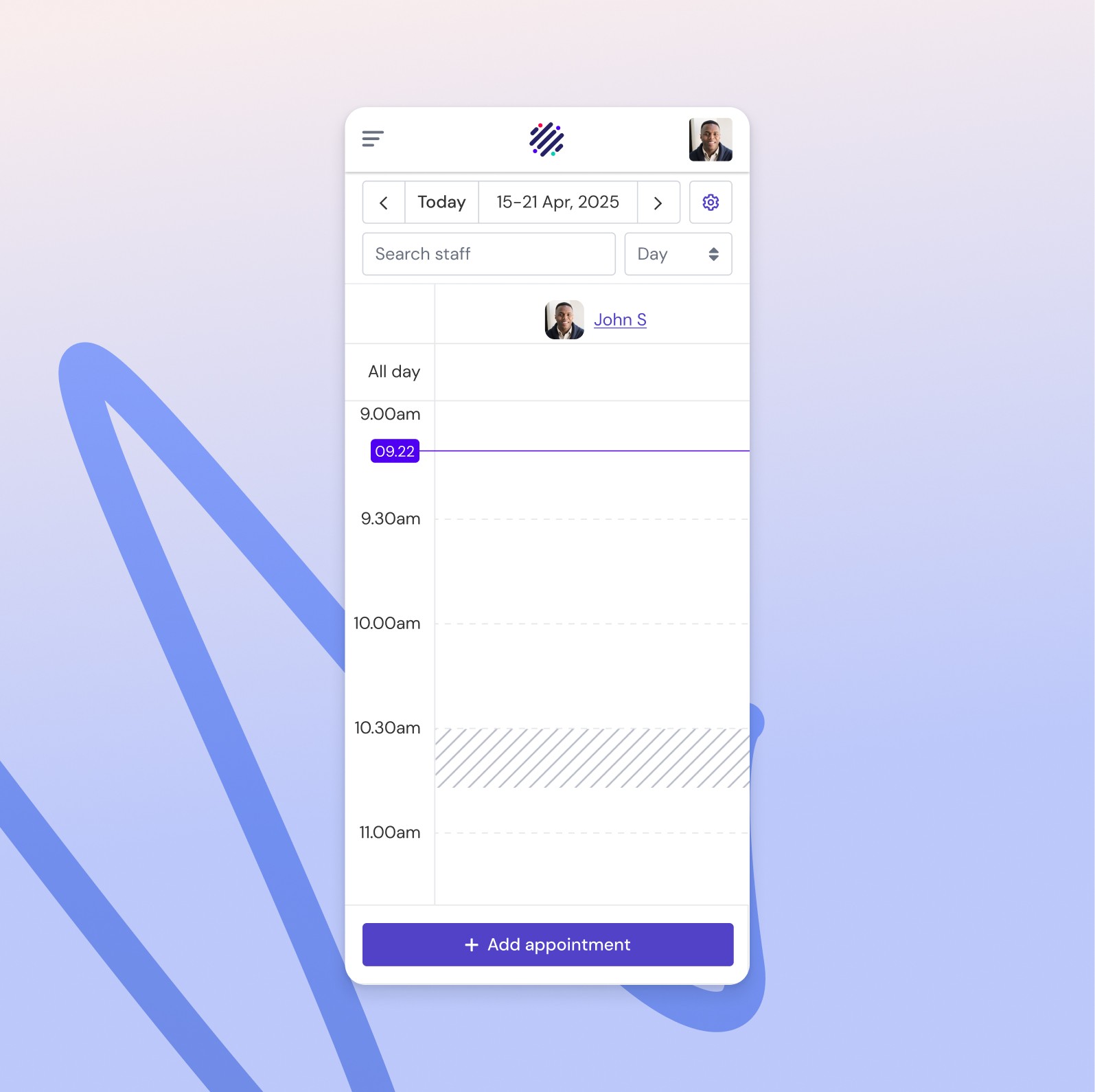
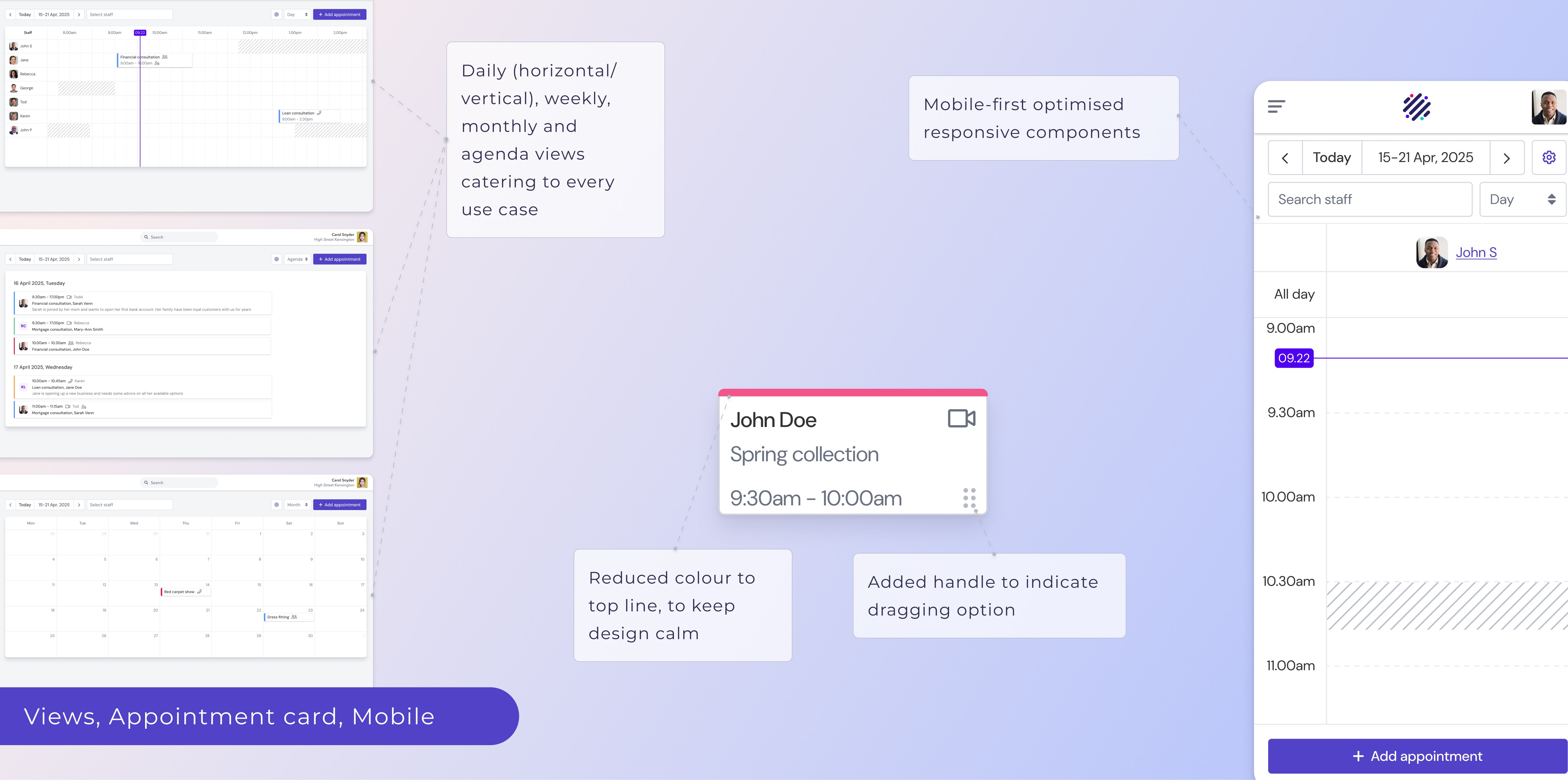
The old calendar was extremely mobile un-friendly , if not entirely un-usable. As part of a wider project to mobile optimise our platform and a growing demand for that medium - I started the designs with a mobile-first approach. Based on my research findings I defined the key actions a user performs whilst on a busy shop floor or on the go in between appointments. I made sure these features are easy accessible on mobile and reduced any complex settings or workflows that only admins who have time to sit down in their office would use.
With limited real-estate I tried to make use of the full screen width for the calendar field or modals that otherwise sit on generously padded modals and tiles on desktop.
I also made sure to position all primary CTA's on a sticky bottom bar to make them easily reachable for the thumb.
_______________
Mobile Design
The old calendar was extremely mobile un-friendly , if not entirely un-usable. As part of a wider project to mobile optimise our platform and a growing demand for that medium - I started the designs with a mobile-first approach. Based on my research findings I defined the key actions a user performs whilst on a busy shop floor or on the go in between appointments. I made sure these features are easy accessible on mobile and reduced any complex settings or workflows that only admins who have time to sit down in their office would use.
With limited real-estate I tried to make use of the full screen width for the calendar field or modals that otherwise sit on generously padded modals and tiles on desktop.
I also made sure to position all primary CTA's on a sticky bottom bar to make them easily reachable for the thumb.
_______________
Prototyping, testing & iteration
I started with low-fidelity prototypes to get the structure and layout right, then moved into high-fidelity designs once the foundations felt solid. I iterated closely with developers and product managers throughout, pressure-testing ideas early and often. Using a fully animated prototype and UserTesting.com, I ran frequent usability sessions with participants who matched our real calendar users. These tests helped compare options, inform design decisions, and catch usability issues we might otherwise have missed, until we landed on the final prototype. We agreed to phase the rollout, starting with a simpler MVP and layering in more advanced features over subsequent releases.
_______________
Prototyping, testing & iteration
I started with low-fidelity prototypes to get the structure and layout right, then moved into high-fidelity designs once the foundations felt solid. I iterated closely with developers and product managers throughout, pressure-testing ideas early and often. Using a fully animated prototype and UserTesting.com, I ran frequent usability sessions with participants who matched our real calendar users. These tests helped compare options, inform design decisions, and catch usability issues we might otherwise have missed, until we landed on the final prototype. We agreed to phase the rollout, starting with a simpler MVP and layering in more advanced features over subsequent releases.
Final design and key decisions
All designs were created with mobile in mind from the start, ensuring the calendar works just as well on smaller screens as it does on desktop. Alongside this, our UX team built a new component library and design system in Figma, designed to be fully accessible and reusable, helping create consistency across the product and making future work faster and easier for the team.
Taking all of the research findings into consideration, I translated them into the final designs. Starting with the general structural layout and progressing into specific features, components down to micro interactions.
Outcome
...increased from an 68.2 "okay" rating to an "excellent" rating of the new calendar design
...of time-on-task, from 30sec to 17 sec to open calendar, locate appt, view infos & change status
...task success rate (preparing for your next appt and mark customer as seen). Increased from 72%
________
Learnings
This project showed me how powerful user research can be- talking to so many customers and seeing the impact and improvement on their busy daily work lives was incredibly rewarding. Running workshops with the team was just as fun and iterating based on real feedback made the calendar genuinely easier and faster to use. It reminded me how much I love UX Design and making an actual impact.
________
Learnings
Working on the Journey Builder was a defining moment in my career — a large, complex project that I led from start to finish. It pushed me beyond my comfort zone and into real product ownership.
This project gave me a much deeper understanding of product management: how to prioritise, how to navigate trade-offs, how to make decisions more strategically- even under ambiguity, and how to keep teams motivated and aligned even when resources are tight and timelines are firm. I learned to balance user needs, business goals, and internal interests — something that popped my idealistic little UX bubble and gave me a more realistic view of what it takes to make good products in the wild.
I also discovered how AI, while never replacing user research or strategic thinking, can speed up design and copywriting tasks a lot!
________
Learnings
Working on the Journey Builder was a defining moment in my career — a large, complex project that I led from start to finish. It pushed me beyond my comfort zone and into real product ownership.
This project gave me a much deeper understanding of product management: how to prioritise, how to navigate trade-offs, how to make decisions more strategically- even under ambiguity, and how to keep teams motivated and aligned even when resources are tight and timelines are firm. I learned to balance user needs, business goals, and internal interests — something that popped my idealistic little UX bubble and gave me a more realistic view of what it takes to make good products in the wild.
I also discovered how AI, while never replacing user research or strategic thinking, can speed up design and copywriting tasks a lot!
_______________
Discovery
All designs were created with mobile in mind from the start, ensuring the calendar works just as well on smaller screens as it does on desktop. Alongside this, our UX team built a new component library and design system in Figma, designed to be fully accessible and reusable, helping create consistency across the product and making future work faster and easier for the team.
Taking all of the research findings into consideration, I translated them into the final designs. Starting with the general structural layout and progressing into specific features, components down to micro interactions.
_______________
Prototyping, testing & iteration
I started with low-fidelity prototypes to get the structure and layout right, then moved into high-fidelity designs once the foundations felt solid. I iterated closely with developers and product managers throughout, pressure-testing ideas early and often. Using a fully animated prototype and UserTesting.com, I ran frequent usability sessions with participants who matched our real calendar users. These tests helped compare options, inform design decisions, and catch usability issues we might otherwise have missed, until we landed on the final prototype. We agreed to phase the rollout, starting with a simpler MVP and layering in more advanced features over subsequent releases.
All designs were created with mobile in mind from the start, ensuring the calendar works just as well on smaller screens as it does on desktop. Alongside this, our UX team built a new component library and design system in Figma, designed to be fully accessible and reusable, helping create consistency across the product and making future work faster and easier for the team.
Taking all of the research findings into consideration, I translated them into the final designs. Starting with the general structural layout and progressing into specific features, components down to micro interactions.